After re-installing Trados on new computer, the project list that loads when opening is the one from my laptop not the new projects on this computer. How can I stop it doing this?

I've recently re-installed Trados on a new computer with Windows 11 and had problems with installing and using due to One Drive. I managed to resolve this with Paul T's help (Case No. CS0037323). However, I've just come to open Trados again on my main computer and it has once again reverted to the project log from my laptop (which I'd just opened by mistake). How can I stop it openng the old laptop project list on this computer rather than my current one? I know I can download them via the project files, but that's such a pain each time it happens. Can I disconnect them in any way? I've disabled the One Drive back-up on my main computer and One Drive back-up isn't installed on my laptop (which is Windows 10), but the One Drive folder, where I keep the laptop Trados files so I can work when I'm away, is still synced so I can copy between the two if necessary. This sharing of project lists never happened with my previous set-up.

Many thanks,

Claire

emoji
Parents
  • Hi ,

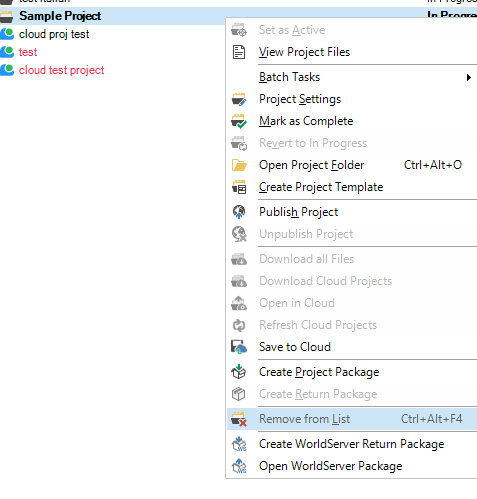
    You can just remove the projects added by mistake from the list - in Projects view - right click on the project you don't want in Trados and select Remove from list. Trados does not save anything internally - projects are always saved locally and if you start new with Trados on a computer, you need to copy the projects and open them again on that computer.

    Screenshot of the Trados Projects view showing a context menu with the 'Remove from List' option highlighted for a project named 'cloud test project'.

    Kind regards,

    Anca

    Anca Stoian RWS Group

    emoji


    Generated Image Alt-Text
    [edited by: RWS Community AI at 4:20 PM (GMT 0) on 21 Jan 2026]
  • Thanks, Anna, but the problem is that it just imports the old list from my laptop and doesn't show any of the new ones. I really don't want it to do this every time and don't understand why it's doing so. I have been able to open them again and add them to the list, but I only have a few projects ongoing at the moment. It would be a different matter if I had lots of ongoing projects. How can I make it remain stable - and different on each computer? 

    emoji
Reply
  • Thanks, Anna, but the problem is that it just imports the old list from my laptop and doesn't show any of the new ones. I really don't want it to do this every time and don't understand why it's doing so. I have been able to open them again and add them to the list, but I only have a few projects ongoing at the moment. It would be a different matter if I had lots of ongoing projects. How can I make it remain stable - and different on each computer? 

    emoji
Children