Error "Invalid class"

Hello,

Whenever I try to open my Trados Studio 2017 installation on my Windows 11 laptop, the error message "Invalid class" appears and Trados won't open.

I tried the workarounds #1, #2 and #3 from this webpage: https://gateway.rws.com/csm?sys_kb_id=b24f61e983466690396947426daad39d&id=kb_article_view . But without any success. I cannot do workaround #4 (SDL Freshstart app) as this apparently cannot be used for Trados Studio 2017.

The problem exists since mid-December. I wonder if it was caused by an update (Windows, Trados, etc.).

I would appreciate any advice. Thank you!

emoji
Parents Reply Children
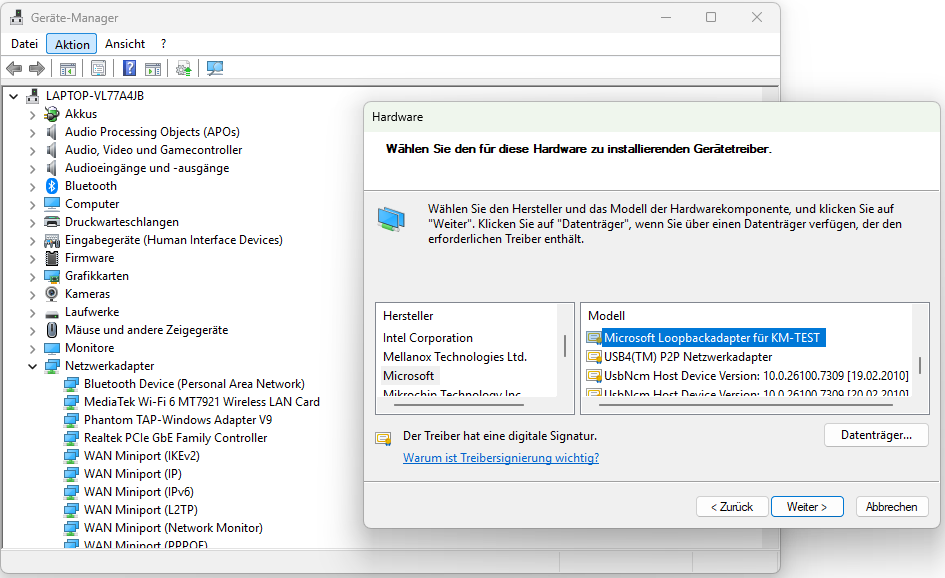
  • Hi Elisa, I tried your solution and was able to install the Microsoft KM-Test adapter (it's called "Microsoft Loopbackadapter für TM-Test" on my Windows 11 system, see screenshot). However, Trados Studio 2017 still doesn't open and instead shows the error message "Invalid class". To be more precise, the Trados opening process starts and runs until the "Checking licenses" step, but then it stops abruptly and shows the error message. Is there any other solution that I may try?

    Device Manager window showing network adapters list, with 'Microsoft Loopbackadapter f r KM-TEST' selected in the Hardware installation dialog.

    emoji


    Generated Image Alt-Text
    [edited by: RWS Community AI at 4:53 PM (GMT 0) on 15 Jan 2026]