Offline deactivation Trados Studio 2014 doesn't work

Hi Everyone,

I'm using an old Trados Studio 2014 license on a backup laptop. I wanted to deactivate the license, from the Activation Wizard in the app, but "Online deactivation" didn't work. I clicked on "Offline deactivation" and got the code, I found the license on the RWS Account, and I pasted the code in the right place, but when I click "DEACTIVATE" - nothing happens. I tried Chrome and Edge, on two different PCs, same thing. I tried resetting the license, but the link redirected me to Community page. So right now I can't go back to activating the backup Studio nor completely deactivate it. Any help would be appreciated.

emoji
Parents Reply
  • Hi Anca,

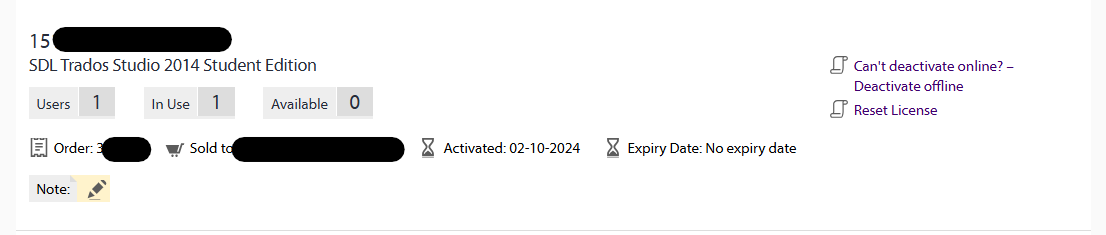
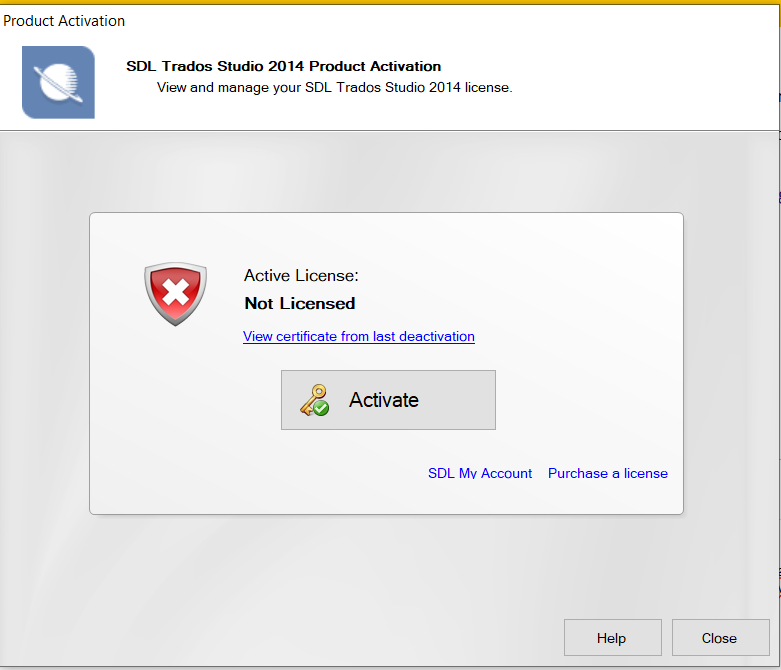
    Thank you very much for your quick reply. I've been using the license just fine even last week, so not sure about the "no longer valid" part(1). As for the deactivation, I activated it on the machine in question in 2024, I wasn't aware that the end of support meant also end of the offline activating/deactivating licenses. Is there really nothing that can be done? Can I "cancel" the offline deactivation attempt from the app level (2)?

    Thanks again for any help.

    Andrzej

    (1)

    License management screen for SDL Trados Studio 2014 Student Edition showing 1 user in use, 0 available, activated on 02-10-2024, with no expiry date. Options to deactivate offline or reset license are visible.

    (2)

    Product activation window for SDL Trados Studio 2014 showing 'Active License: Not Licensed' with a red shield icon. Options to activate, view certificate, and purchase a license are displayed.

    emoji


    Generated Image Alt-Text
    [edited by: RWS Community AI at 9:42 AM (GMT 0) on 27 Oct 2025]
Children