
Updating Translation Memories?

How can I update my main or project translation memories at the end of a project based on xliff segment status only?

For example, I want to update the TMs with just the locked segments!  Is there a way to have options for this in the Batch Task list?

That would indeed be great, instead of having only the options of updating the translated or approved segments, as in many scenarios we need to update the TM based on specific segment status.

Parents
  • Yes I think having the option to update TM's purely based on a locked segment should be supported by default, but from the menu you are right. It is not.

    While you could use the filter options in the editor view, batch select segments and change segments status around to match what we do support when performing a Translation Memory Update - I suspect it would be  cumbersome and challenging to track with the change of segment statutes

    However what you can do is the following:

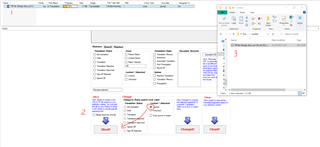
    1. Install SDLXLIFF Toolkit: https://appstore.sdl.com/language/app/sdlxliff-toolkit/296/
    2. Go to your project files were you have locked segments
    3. Use the tookit but selecting locked and sliceIT
    4. It creates a second sdlxliff file that only contains locked segments
    5. Update TM from this file
      This can be done in many ways: Add file to existing project, direct TM import via maintenance view, create new project, use of SDLTM Import Plus App (https://appstore.sdl.com/language/app/sdltm-import-plus/1073/)

    Trados Studio editor view showing a list of segments with various statuses including locked, untranslated, and draft.

    Oana Nagy | QA Engineer | RWS Group

    emoji


    Generated Image Alt-Text
    [edited by: Trados AI at 3:43 AM (GMT 0) on 5 Mar 2024]
Reply
  • Yes I think having the option to update TM's purely based on a locked segment should be supported by default, but from the menu you are right. It is not.

    While you could use the filter options in the editor view, batch select segments and change segments status around to match what we do support when performing a Translation Memory Update - I suspect it would be  cumbersome and challenging to track with the change of segment statutes

    However what you can do is the following:

    1. Install SDLXLIFF Toolkit: https://appstore.sdl.com/language/app/sdlxliff-toolkit/296/
    2. Go to your project files were you have locked segments
    3. Use the tookit but selecting locked and sliceIT
    4. It creates a second sdlxliff file that only contains locked segments
    5. Update TM from this file
      This can be done in many ways: Add file to existing project, direct TM import via maintenance view, create new project, use of SDLTM Import Plus App (https://appstore.sdl.com/language/app/sdltm-import-plus/1073/)

    Trados Studio editor view showing a list of segments with various statuses including locked, untranslated, and draft.

    Oana Nagy | QA Engineer | RWS Group

    emoji


    Generated Image Alt-Text
    [edited by: Trados AI at 3:43 AM (GMT 0) on 5 Mar 2024]
Children
No Data