 Translate


How do we change Studio 2019 QA settings so it does not report a "space" in draft translation as error?

RWS Community
How do we change Studio 2019 QA settings so it does not report a "space" in draft translation as error?
I discussed this with the development team and this is apparently by design. The phrase "Forgotten and empty translation" apparently includes segments that only have spaces in them. So this one:
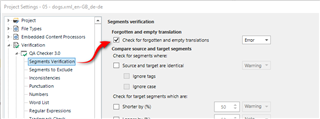
Having said this the team are willing to listen to whatever reasoning there is for why the behaviour shouldn't be this way. So if you have some real examples of when you would want to have a space in the target segments, and perhaps even the usecase and solutions you use to get them in there, then it would be very useful to hear them.
Copying a couple of people I think have done this in the past...
Paul Filkin | RWS
Design your own training!
You've done the courses and still need to go a little further, or still not clear?
Tell us what you need in our Community Solutions Hub


Hi Paul Filkin, Elevate Autumn 2021,
I see why you're asking for comment. It's currently an 'all or nothing' situation. You can't check for forgotten or empty translations without also having segments flagged up where a space has been inserted to prevent the source content flowing into the target document. This is indeed something I do, for example where the only content of the source segment is the German verb at the end of a sentence that has been unchangeably auto-segmented by a client database, and I want the full stop to be at the end of the previous segment because the verb is not at the end of the English sentence and a merge is not possible.
When I receive a proofreading job this box is ticked in the agency's required project settings so I just cope with it rather than untick it and risk missing an untranslated target segment that the translator or I might have accidentally deleted or left empty.
Interestingly, the above setting also picks up, for example, just a full stop.
In some formats, it is a problem when a sentence has been segmented with content that HAS to be translated in each segment of the sentence because it is present only once in the SDLXLIFF but repeated in further instances in the final database-generated PDF document. This happens, for example, in imported bilingual .xlf format and translators really don't want to jump through hoops so that the verb remains in that segment, but ideally I have to rewrite the sentence in a clumsy way to achieve that if possible, so that the end client's database doesn't contain and repeatedly generate an incorrect translation... I hope I'm explaining myself intelligibly...
I for one would be pleased if there were a second tick that allowed to ignore a space or a full stop, for example. However, it isn't essential to life 
Thanks and all the best,
Ali 

Thanks Alison Field, that's helpful. Tagging a couple of interested parties in case of questions.
Paul Filkin | RWS
Design your own training!
You've done the courses and still need to go a little further, or still not clear?
Tell us what you need in our Community Solutions Hub
Hi all,
There is a simple workaround to prevent segments with just a space from being flagged up when the QA "Forgotten and empty translation" box is ticked:
Display filter for ^\s$
Click in the top left corner to select all
Ctrl+L to lock all these segments
Then tick 'ignore locked segments' in the QA settings
Job done!
Ali
Thanks Alison Field, helpful as always. The most important part you answered earlier which was why do users want to do this?
where a space has been inserted to prevent the source content flowing into the target document.
Is this the only reason for this usecase? It is a good one, but just checking :-)
Paul Filkin | RWS
Design your own training!
You've done the courses and still need to go a little further, or still not clear?
Tell us what you need in our Community Solutions Hub

If this is the case and you have a badly segmented file, you can insert a space into a segment which does not require translation and set its status to "sign-off rejected", then lock it. With the QA checker set up accordingly such segments will be completely excluded from the QA and will not produce any translation units in the TM. This is so far the best solution I have. And we do get really badly segmented files from our customers, oh yes... Dealing with these is not always easy. The easiest way is to create a new project with such sdlxliff file(s) and either merge segments as far as possible (even over paragraph boundaries) or use the edit source feature.
_________________________________________________________
When asking for help here, please be as accurate as possible. Please always remember to give the exact version of product used and all possible error messages received. The better you describe your problem, the better help you will get.
Want to learn more about Trados Studio? Visit the Community Hub. Have a good idea to make Trados Studio better? Publish it here.
If this is the case and you have a badly segmented file, you can insert a space into a segment which does not require translation and set its status to "sign-off rejected", then lock it. With the QA checker set up accordingly such segments will be completely excluded from the QA and will not produce any translation units in the TM. This is so far the best solution I have. And we do get really badly segmented files from our customers, oh yes... Dealing with these is not always easy. The easiest way is to create a new project with such sdlxliff file(s) and either merge segments as far as possible (even over paragraph boundaries) or use the edit source feature.
_________________________________________________________
When asking for help here, please be as accurate as possible. Please always remember to give the exact version of product used and all possible error messages received. The better you describe your problem, the better help you will get.
Want to learn more about Trados Studio? Visit the Community Hub. Have a good idea to make Trados Studio better? Publish it here.