
This discussion has been locked.
You can no longer post new replies to this discussion. If you have a question you can start a new discussion

Autosave stops working and updating files stored in the cloud project

Hi,

from time to time in Trados Studio 2022 (regardless of subsequent updates) I have a problem with some files for which the autosave function suddenly stops working. Manually saving the files then stops updating the project files stored in the cloud, and every time I click save I get the following message:
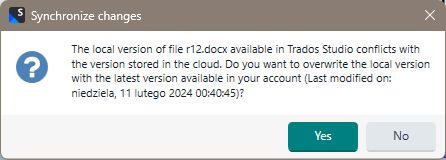
Synchronize changes dialog box in Trados Studio with a warning message. It states that the local version of file r12.docx conflicts with the version in the cloud and asks if the user wants to overwrite the local version with the cloud version, last modified on a specific date and time.

This is not only annoying, but also very dangerous, because if I accidentally restore an old version from the cloud I may lose a huge part of the translation, because in this particular case the problem occurred practically after translating a small part of the file.

Kind regards,

Lech Lachowski


Generated Image Alt-Text
[edited by: RWS Community AI at 10:37 PM (GMT 0) on 14 Nov 2024]

emoji
Parents
  • Hi,

    is there any solution for this problem? Because the autosave still does not work for this file and manual savings still do not update the file stored in the cloud project. Every time I save the sobsequent phase of translation I need to be very careful to not restore the old version of the file. This is definetly a bug in the software. My cloud license and Trados Studio license are valid.

    Kind Regards,

    Lech Lachowski  

    emoji
  • I would like to add only that the progress bar of the file on the file list is also not updated, because it stopped on the value that was last saved in the cloud. Is there any way to synchronize these two files: local and cloud?

    emoji
Reply Children
No Data