Avoid automatic application of automated translation in Online editor

Hi everyone! I use Language Weaver when translating in online editor, but I do not wish the segments to be automaticaly translated, I do not want the translation to appear automaticaly in the segments. Is there a way to switch off this automated translation (as there is in Studio)?

Thanks!!

emoji
Parents
  • Hi  ,

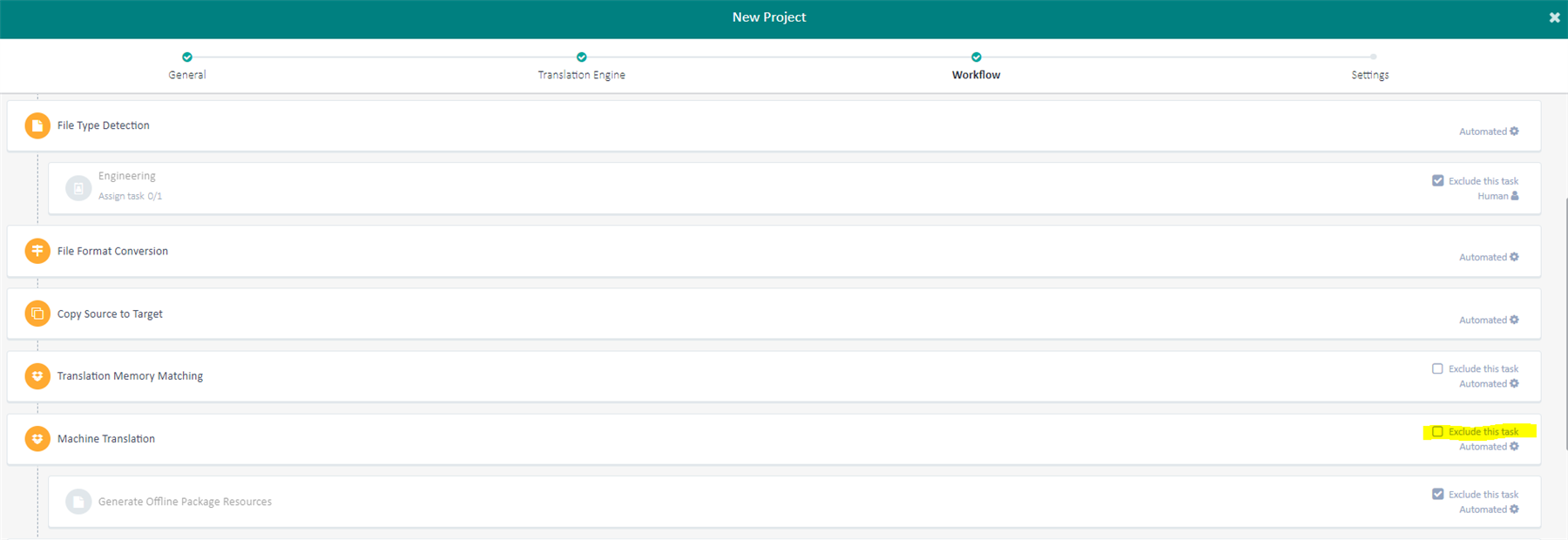
    The Machine Translation (Language Weaver) task can be "bypassed" from the translation process when you set up the Workflow and you choose to Exclude the task. This means that when the project is created there will be no results coming from Language Weaver via pre-translation process. You will still be able to use the Language Waver when you work in Online Editor.

    Here is a screenshot:

    Trados Studio New Project workflow settings showing Machine Translation task with 'Exclude this task' option selected.

    I hope this answers your question.

    Alex J.

    emoji


    Generated Image Alt-Text
    [edited by: Trados AI at 10:11 AM (GMT 0) on 4 Mar 2024]
Reply
  • Hi  ,

    The Machine Translation (Language Weaver) task can be "bypassed" from the translation process when you set up the Workflow and you choose to Exclude the task. This means that when the project is created there will be no results coming from Language Weaver via pre-translation process. You will still be able to use the Language Waver when you work in Online Editor.

    Here is a screenshot:

    Trados Studio New Project workflow settings showing Machine Translation task with 'Exclude this task' option selected.

    I hope this answers your question.

    Alex J.

    emoji


    Generated Image Alt-Text
    [edited by: Trados AI at 10:11 AM (GMT 0) on 4 Mar 2024]
Children