
 Translate


We have just released the latest update to the Trados Cloud platform, and we would like to share the new functionality that has been delivered.
New features and updates are automatically added to your account, so simply log in to Trados, and they will be available immediately.
Additional context for proposed translations in the Online Editor
(Applies to Trados Team, Accelerate/Business and Enterprise)
In a previous release, we introduced the ability to view surrounding segments alongside TM match proposals in the Lookup panel. We are now extending this further with the ability to request a preview of the original file directly from the Lookup panel, giving linguists a much richer understanding of the context behind a proposed translation.
When reviewing a proposed translation unit, if the surrounding segments shown are not sufficient to understand the full context, linguists can request a file preview showing up to 10 segments before and after the selected unit. It is also possible to switch between source files without leaving the view, making it straightforward to compare context across multiple files.
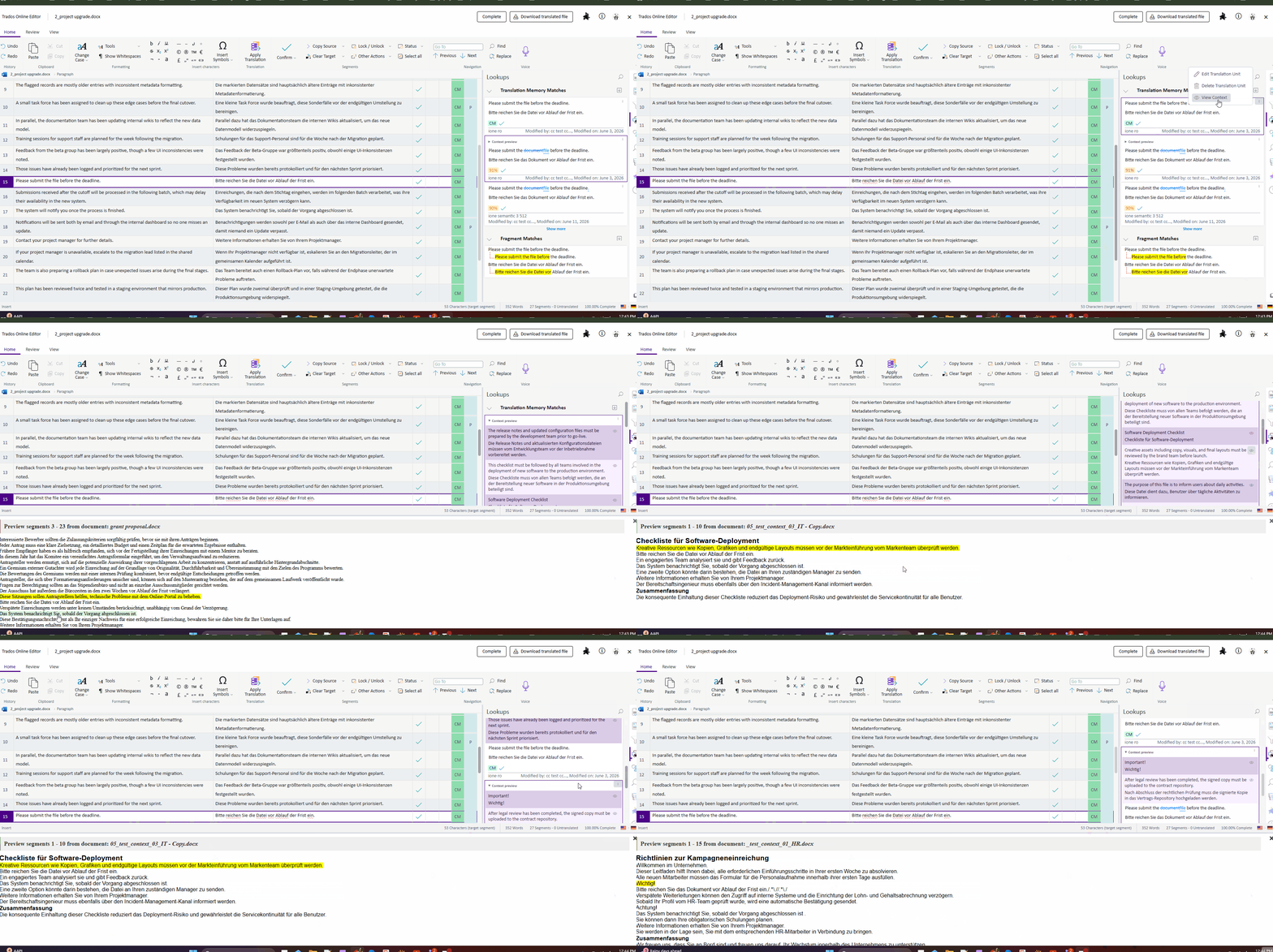
Following these latest enhancements, linguists can now:
- See the bigger picture: understand the origin and context of a proposed translation before accepting it
- Spot context mismatches early: identify where a proposal may not be the right fit for the current content
- Compare across files: switch between original files to explore related context without interrupting your workflow
Project Termbases for translation packages
(Applies to Trados Team, Accelerate/Business and Enterprise)
When exporting translation packages for offline work in Trados Studio, Trados has historically included the full content of any termbases attached to the project. For large termbases, this can result in linguists being presented with significant volumes of terminology that has no relevance to the content they are working on, making it harder to identify the terms that matter and increasing package sizes unnecessarily.
With this release, you can now configure whether to export a complete termbase or a project termbase - a targeted subset containing only the terms identified in the project's source files. Linguists downloading translation packages will then receive focused, relevant terminology guidance without the noise of the full termbase.
The option is configurable for the Generate Offline Package Resources workflow task , which now offers two settings:
- Complete termbase - exports the full termbase content (default, existing behaviour)
- Project termbase - exports only the terms relevant to the project's source content
The default setting remains Complete termbase, meaning there is no change in behaviour unless you choose to update your workflow task configuration. Customers who wish to take advantage of this feature should update their configuration accordingly. Please note that we plan to change the default setting in a future release but will provide advance notice before doing so.
Trados API updates
This release introduces the following improvements to the Trados API:
- With this release we deliver full vendor management capabilities. You can now Get, List, Create, Update, and Delete vendors via the Public API
- We have also introduced vendor order template management. You can now Get, List, Create, Update, and Delete vendor order templates
- You can now Get and List quote templates
- The List Custom Field Definitions endpoint has been extended with a resourceType query parameter, allowing you to filter custom fields by resource type
- The Get Project endpoint now exposes the reportCrossFileRepetition field at project level
- The List Users endpoint now supports filtering by email address
- Various bug fixes
Visit the What’s New page for more information.
We hope this post was informative, and we look forward to continuing to provide you with updates to the product.
Trados Product Management

