
 Translate


We have just released the latest update to the Trados Language Technology platform, and we would like to share the new functionality that has been delivered.
New features and updates are automatically added to your account, so simply log in to Trados, and they will be available immediately.
Public Termbases
(Applies to Trados Team, Accelerate/Business and Enterprise)
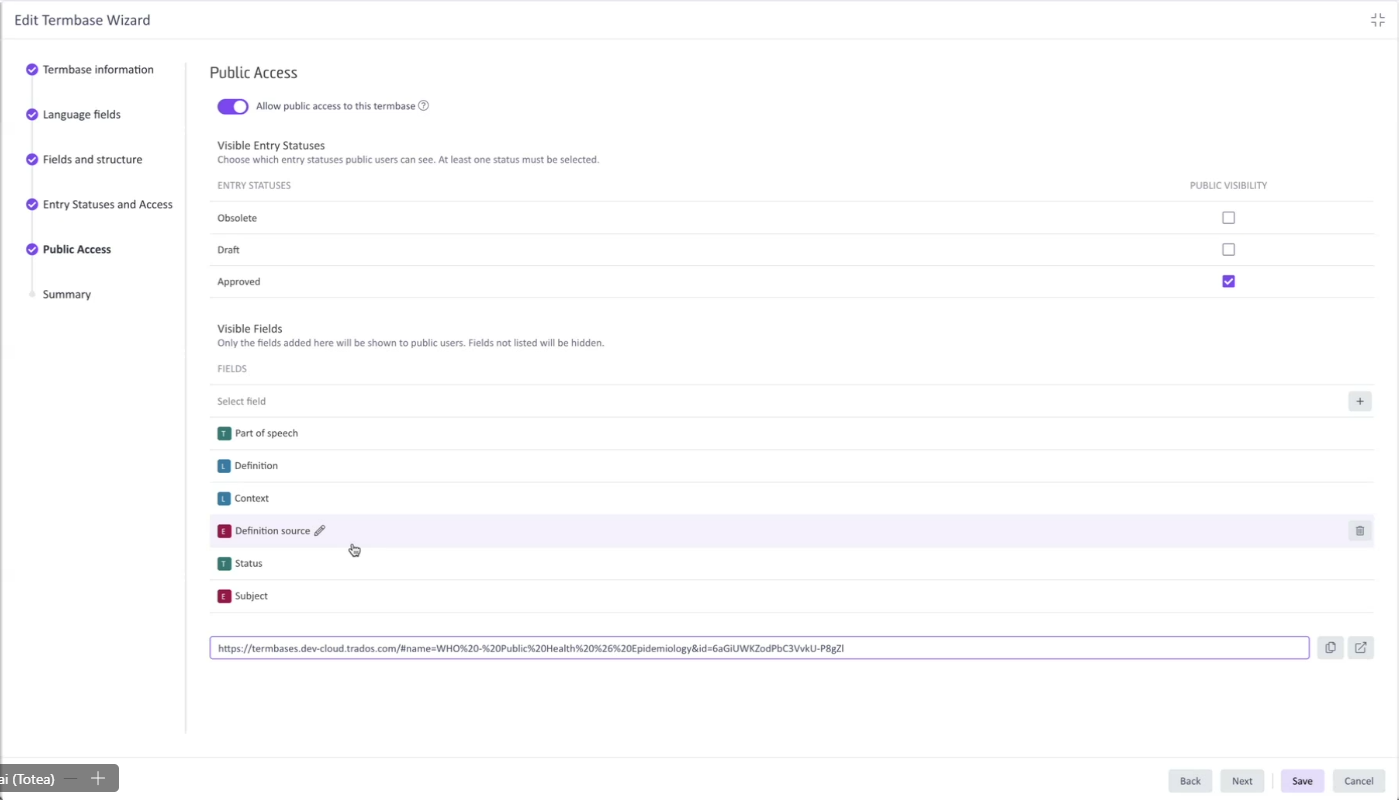
We are pleased to introduce Public Termbases, a new capability that allows you to publish your Trados Termbases to external audiences - with no Trados Cloud account required to view them.
This is particularly valuable for organizations with public transparency requirements, such as those in the public sector, where terminology needs to be openly accessible to a wider audience. Published Termbases can be configured to control which entry statuses and fields are visible to public users, ensuring you retain full control over what is shared.
- Publish your Termbase to external audiences without requiring a Trados Cloud account
- Configure which entry statuses (e.g. Approved) and fields are visible to public users
- Access is granted via a shareable URL
Please note that Public Termbases is not included in any Trados subscription by default and must be requested separately.
SID Match feature
(Applies to Trados Team, Accelerate/Business and Enterprise)
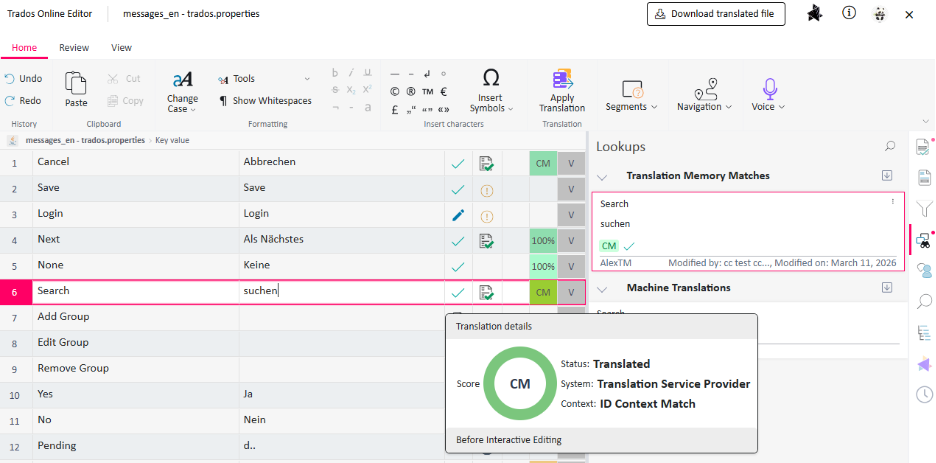
Trados now supports Segment Identifier (SID)-based context matching. An SID is a unique identifier assigned to a segment within a source file, allowing the system to match segments based on where they sit in the file structure - rather than relying on text content alone. This gives translators greater confidence that a Context Match is genuinely reusable, not just textually similar.
When an SID match is found, it is surfaced as a Context Match (CM) in the Online Editor, visually distinguished from standard text-based context matches so translators can quickly understand the source of the match. Additional details are available via a new "Context" property in the Translation Details pane.
SID matching is supported for the following file types:
- XML 2
- JSON
- YAML
- Java Resources
For details on how to configure SID matching for each supported file type, please refer to the documentation.
Context for Translation Unit matches
(Applies to Trados Team, Accelerate/Business and Enterprise)
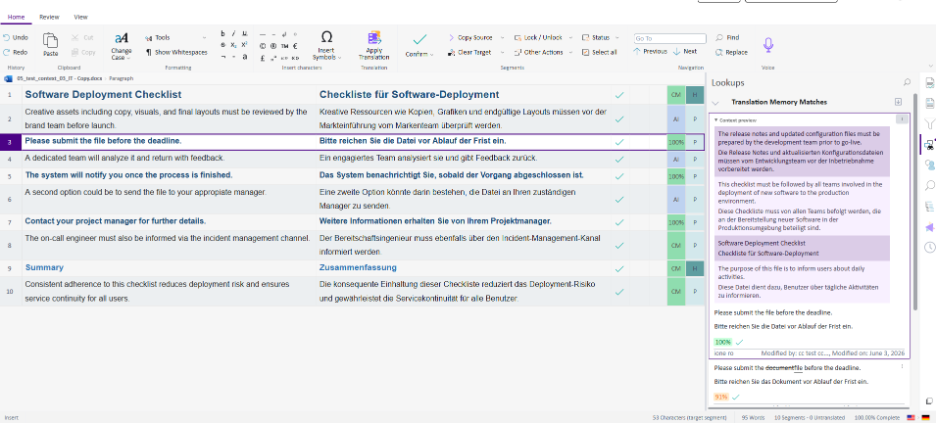
TM match proposals in the Lookups panel now display the surrounding source and target segments from the original document alongside each match, making it easier to assess whether a match is appropriate for your current context - without leaving the Online Editor.
As shown below, the context preview appears directly within the Lookup panel, giving translators immediate visibility of how a matched segment sits within the broader document.
This is the first phase of a broader enhancement to contextual matching. In a future release, we plan to extend this further to allow a fuller section of the source document to be previewed directly in the editor.
Concurrent Editing now available for Customer Review
(Applies to Trados Team, Accelerate/Business and Enterprise)
Following the introduction of real-time concurrent editing in our previous release, we are pleased to announce that this capability has now been extended to Customer Review tasks initiated from the Customer Portal.
This brings the full benefits of concurrent editing to one of the key workflows where collaboration matters most - enabling multiple Customer Reviewers and Subject Matter Experts to work simultaneously within the same document in real time, without risk of conflicting edits.
Multiple Customer Reviewers and Subject Matter Experts can now work concurrently within the same file during a Customer Review task. Segments actively being edited remain locked to prevent accidental overrides, with a tooltip identifying who is working on them. Connected users are visible at the bottom of the Online Editor interface
As noted in our previous release, this completes the rollout of Concurrent Editing across all supported task types.
Batch accept and complete tasks on behalf of a group
(Applies to Trados Team, Accelerate/Business and Enterprise)
When Concurrent Editing was introduced, accepting and completing tasks on behalf of a group was limited to individual tasks only. With this release, both actions now support batch operations, making it significantly faster to manage group-assigned tasks at scale.
- Tasks available for group assignment can now be accepted in bulk on behalf of one of the assigned groups
- Completed tasks can similarly be signed off in batch, rather than one by one
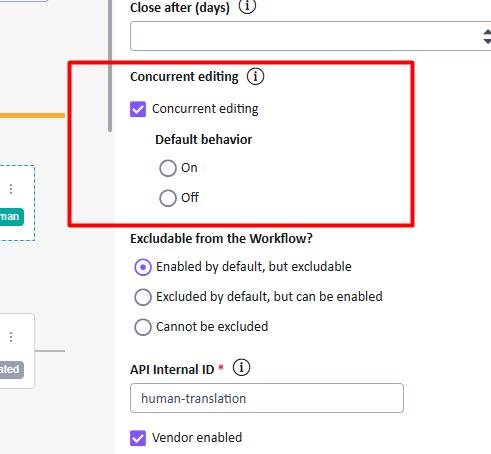
Alongside this, administrators now have greater control over how Concurrent Editing is configured at the task level. A new setting allows Concurrent Editing to be enabled or disabled for a given task, with a configurable default behaviour (on or off) that can still be overridden within individual workflow task configurations.
Granular email notification preferences
(Applies to Trados Team, Accelerate/Business and Enterprise)
Users can now take greater control over the email notifications they receive from Trados. Rather than a single on/off switch for all notifications, individual notification types can be enabled or disabled independently across a range of project and task-related events.
Notification preferences are managed under User Settings > E-mail Notifications.
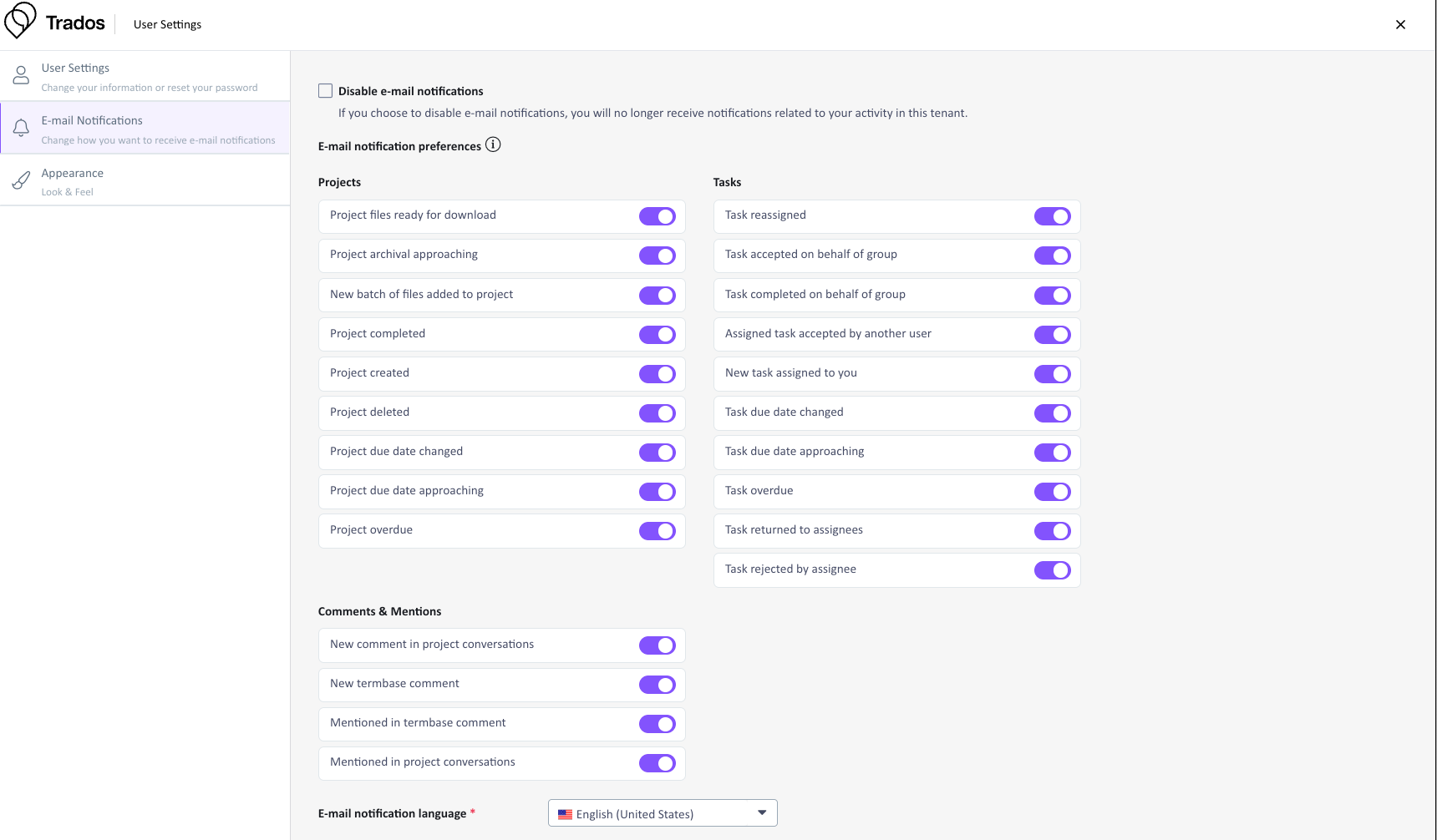
Please note that there may be up to a one-hour delay between updating your notification preferences and the changes taking effect.
Advance Notice: 2 million Translation Unit Limit
(Applies to Trados Team, Accelerate/Business and Enterprise)
We are providing advance notice that a limit of 2 million Translation Units (TUs) per Language pair will be introduced and enforced from late-June 2026. We will confirm the exact date closer to the time.
Once enforced, the following system behaviours will apply:
- Language pairs exceeding 2 million TUs will no longer accept new imports
- Project-related interactions (such as confirming TUs and using Update TM) will continue to function normally
We strongly recommend reviewing and structuring your TMs proactively to ensure they remain within this limit ahead of enforcement. If you need assistance, our Professional Services team is available to advise on TM management best practices.
Additional changes
-
When performing a concordance search in the Online Editor, results now include matches from all available Termbases in addition to Translation Memories, providing a comprehensive view of existing translations and terminology
-
AI Terminology Extraction (Public Preview) now supports bilingual file formats, including XLIFF and SDLXLIFF, in addition to the source file types supported at launch
-
The "NMT" match type is being renamed to "AI" across the Trados portfolio, better reflecting the range of AI technologies - including Large Language Models - that power machine-generated translation suggestions today. This change is being rolled out incrementally, starting with the Online Editor in this release, with further areas of the platform to follow in the coming weeks
-
Various bug fixes and UX enhancements have been applied to improve overall stability and user experience.
We hope this post was informative, and we look forward to continuing to provide you with updates to the product.
Trados Product Management


