
Trados Business Manager – End of Life Announcement

Trados Business Manager (TBM) has reached end of life. Following the discontinuation of TBM sales on 31 October 2023, all maintenance and support services will conclude on 31 October 2024.
What Does This Mean for TBM Users?

  • End of Services: RWS will no longer provide any services related to the installation or updating of TBM.
  • Existing Installations: TBM will remain functional where already installed, but the RWS support team will not offer assistance in troubleshooting issues, addressing reported problems, or providing further development for TBM.
  • Documentation: The TBM documentation has been removed from docs.rws.com.
  • Community Support: The community forum for TBM will remain accessible in a read-only format for users to reference if needed.

Latest version 6.1.73 (12/2/2022) is not downloadable

Hi Eugene,

I cannot update to the latest version due to the following error. It seems that the remote server cannot be found. Is this update available? Or may you share here the download link for the lastest version please?
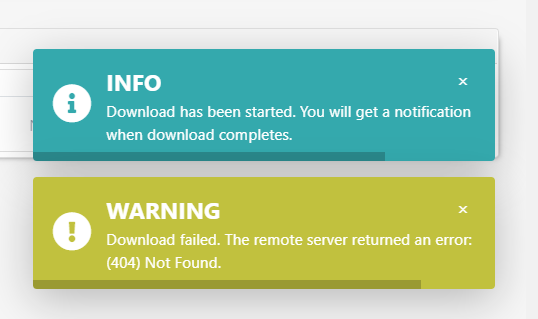
Info message indicating download has started with notification upon completion.


Generated Image Alt-Text
[edited by: Trados AI at 11:03 AM (GMT 0) on 4 Mar 2024]

emoji
Parents Reply
  • Hi Mike,

    It should not be the case. By default, Print button is indeed not available there. But it will appear if you create inplace report for the Invoice In data type. To check if your template is inplace or not, you can go to Report and templates, select your template and click Edit o the toolbar. In the dialog, you will find Inpolace report checkbox, as well as linked data type. I just rechecked and confirm that ot works on my side after latest update. Can you please check?

    emoji
Children

