Trados Business Manager – End of Life Announcement

Trados Business Manager (TBM) has reached end of life. Following the discontinuation of TBM sales on 31 October 2023, all maintenance and support services will conclude on 31 October 2024.
What Does This Mean for TBM Users?

  • End of Services: RWS will no longer provide any services related to the installation or updating of TBM.
  • Existing Installations: TBM will remain functional where already installed, but the RWS support team will not offer assistance in troubleshooting issues, addressing reported problems, or providing further development for TBM.
  • Documentation: The TBM documentation has been removed from docs.rws.com.
  • Community Support: The community forum for TBM will remain accessible in a read-only format for users to reference if needed.

Urgent! ... Trados Business Manager does not start anymore. No reason!

Dear friends, this is BAD, please ... help me ...
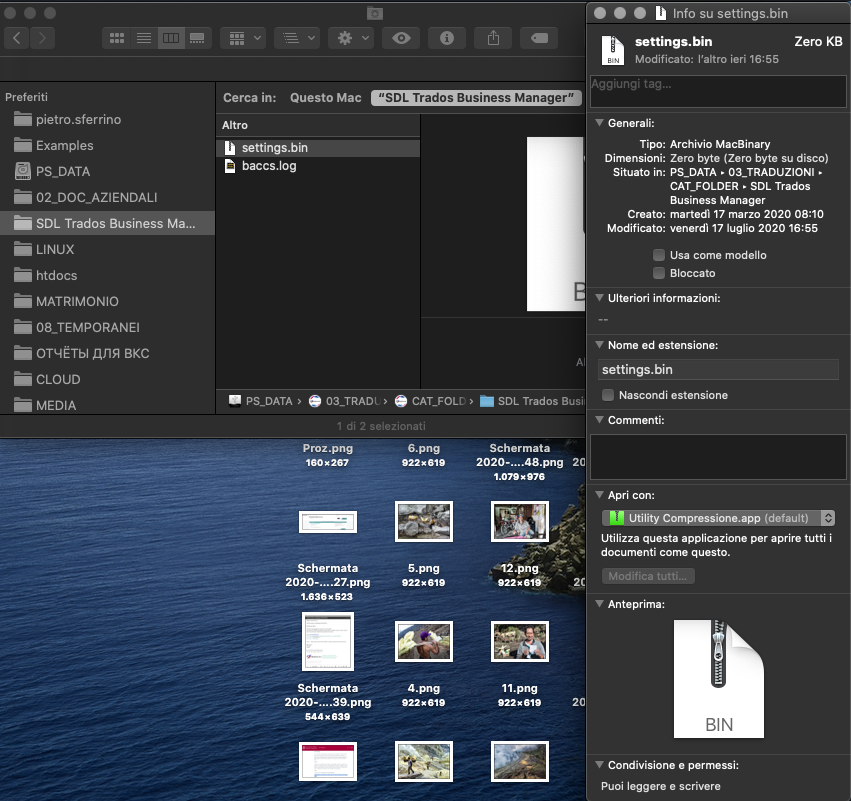
With NO any apparent reason, my Business Manager ceased to work ... It was working perfectly fine untill, at a certain point, it get stucked and now even after restarting updating etc etc my system says that the "settings.bin" file is being in use by another process ... I think this is not possible. No any action has been taken while I was working on the business manager (no update, no upgrade; nothing!)

Hope we can find a solution ASAP!
Many thanks.
Pietro
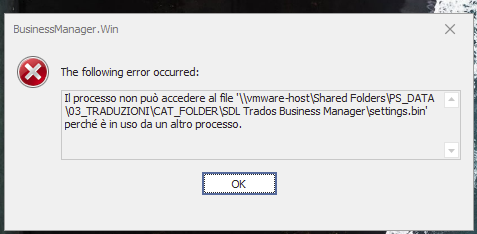
Error message in Trados Business Manager stating 'The process cannot access the file settings.bin because it is being used by another process.' with an OK button.

File explorer showing 'settings.bin' file with zero KB size, indicating it might be empty or corrupted.


Generated Image Alt-Text
[edited by: Trados AI at 10:53 AM (GMT 0) on 4 Mar 2024]

emoji
Parents Reply Children
  • Hi Pietro,

    Not sure why, but I didn't get notification about this thread.  But got it today.

    Looks like it says that the app can't access settings file. So, will it launch if you simply delete this file? This file only contains information about database file location. So, if you delete this file, and if you use non-default database location, then empty database will be created in default location after deleting this file. If the app launches correctly, go to settings, change database path, and answer No to the question about moving ypur current database into a new location (because 8f you answer Yes, this empty database will overwrite your real database. Then, restart the app and it should work.

  • Thank You Eugene. I will try tomorrow ...

    I have a question ...

    When I installed business manager I made a mistake ... I choose as installation folder, a folder with a very long name. Is there a way (while I am going to delete that settings file) to rename the installation folder changing it from "SDL_Business_Manager" into something like "SDLBM" ... Does it make sense? (Because I think I have problem with long paths) ... If business manager would be a 64 bit program, would it be different? Is there any plan to make business manager and trados studio itself a 64 bit app???

    Sorry for so many questions.

    I will let you know tomorrow about the setti g file.

    Many thanks.

    Pietro

  • Well, it depends. You can simply rename installation folder, and application will still work. However, if you run installer with new version, it will attempt to install into a folder stored in registry. So, it's better to reinstall completely. The only thing you need to backup is sdf database file. Nothing more. And settings.bin, if you use non-default database location.

    If business manager would be a 64 bit program, would it be different? Is there any plan to make business manager and trados studio itself a 64 bit app???

    Yes, next version will be 64-bit. It will be completely new, attempting to solve all downsides which we have in TBM today.

  • I'm responsible only for business manager Slight smile And yes, want to make it working on macs!  we're focused on this, maybe 4 months from now. But no promises! Btw, it's planned to implement auto updater as well, so no more updates and installs. Long work ahead and only bug fixing updates for the current version, but i believe that's worth that! ))

  • About the settings.bin file ... Well, that was STRANGE ... All I had to do was to rename the file, and a brand NEW settings.bin file has been automatically created by Business Manager SAVING all the previous data! ... So, who knows ... maybe the file went simply get corropted or, who knows? ... By the way, it seems it works now as before!

    Thank You Mate !!! Slight smileSlight smileSlight smile

    Have a great day!
    Pietro

  • Hello Eugene! So long!

    what you say is crucial to put in big letters during installation: " The only thing you need to backup is sdf database file. Nothing more. And settings.bin, if you use non-default database location."

    I installed the latest version offered, and I didn't see it anywhere. I use a custom folder and a custom quick launch in task bar, so I was just launching my old version again and again, totally unaware that the latest version "hides" in My Documents.... Crazy! 

  • Hello, Erik! Indeed long :)

    Can't confirm that it's "crazy", because during installation you can choose where to install. By default, it goes to My documents. It's not good practice, but again, during installation you can change it to Program files. When app is installed to Program files, it can't store database file inside installation folder. So, installation becomes "divided". In case of putting it into My documents (or another local folder), the whole application along with database is stored in a single folder, which makes it portable. That's the reason of doing this, and I suppose future versions will follow the same practice.

  • I knew it after writing "crazy", I meant to show surprise. Sorry Eugene :)

    Thankfully the application is standalone as always and indeed I have it installed elsewhere. (Not in Programs not in Documents... I have all my business files and translations on another harddrive, precisely to avoid that any software, backup or whatever messes with it. The nasty influence of mobile phone operating systems is causing more and more removal of user choices.

    Back on topic, congratulations. For now I'm running the previous release, i like it still called Baccs :Ç)