Trados Business Manager – End of Life Announcement

Trados Business Manager (TBM) has reached end of life. Following the discontinuation of TBM sales on 31 October 2023, all maintenance and support services will conclude on 31 October 2024.
What Does This Mean for TBM Users?

  • End of Services: RWS will no longer provide any services related to the installation or updating of TBM.
  • Existing Installations: TBM will remain functional where already installed, but the RWS support team will not offer assistance in troubleshooting issues, addressing reported problems, or providing further development for TBM.
  • Documentation: The TBM documentation has been removed from docs.rws.com.
  • Community Support: The community forum for TBM will remain accessible in a read-only format for users to reference if needed.

Dashboard

Is there a setting somewhere to get the software to calculate top customers, volumes etc. on the customer dashboard by payment date rather than invoice date? Since I do taxes based on when the jobs are paid, it would be helpful to be able to get the totals by payment date rather than invoice/work date.

Thanks!

Parents
  • Hello, Casey,

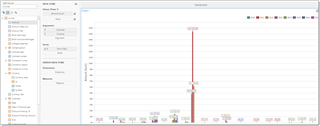
    Well, quickreports will allow to implement that. In invoices, we have Date paid in full column. You can use it for example, to create top customers chart, something like this, if I understood your question correctly:

    Screenshot of Trados Studio showing a chart with invoice term as Series source, customer name and currency name as arguments, and invoice amount as value.

    I've added invoice term as a Series source, customer name and currency name as argument, and invoice amount as a value.

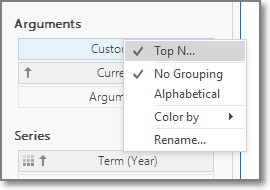
    If you need top5 for example, right click on a customer name and select Top N:

    Close-up of Trados Studio's chart settings with a context menu open, showing options including 'Top N', 'No Grouping', and 'Alphabetical'.

    Will that work?

    emoji


    Generated Image Alt-Text
    [edited by: Trados AI at 10:43 AM (GMT 0) on 4 Mar 2024]
Reply
  • Hello, Casey,

    Well, quickreports will allow to implement that. In invoices, we have Date paid in full column. You can use it for example, to create top customers chart, something like this, if I understood your question correctly:

    Screenshot of Trados Studio showing a chart with invoice term as Series source, customer name and currency name as arguments, and invoice amount as value.

    I've added invoice term as a Series source, customer name and currency name as argument, and invoice amount as a value.

    If you need top5 for example, right click on a customer name and select Top N:

    Close-up of Trados Studio's chart settings with a context menu open, showing options including 'Top N', 'No Grouping', and 'Alphabetical'.

    Will that work?

    emoji


    Generated Image Alt-Text
    [edited by: Trados AI at 10:43 AM (GMT 0) on 4 Mar 2024]
Children
No Data