Trados Business Manager – End of Life Announcement

Trados Business Manager (TBM) has reached end of life. Following the discontinuation of TBM sales on 31 October 2023, all maintenance and support services will conclude on 31 October 2024.
What Does This Mean for TBM Users?

  • End of Services: RWS will no longer provide any services related to the installation or updating of TBM.
  • Existing Installations: TBM will remain functional where already installed, but the RWS support team will not offer assistance in troubleshooting issues, addressing reported problems, or providing further development for TBM.
  • Documentation: The TBM documentation has been removed from docs.rws.com.
  • Community Support: The community forum for TBM will remain accessible in a read-only format for users to reference if needed.

How can I edit the calculation breakdown of a project?

Hello,

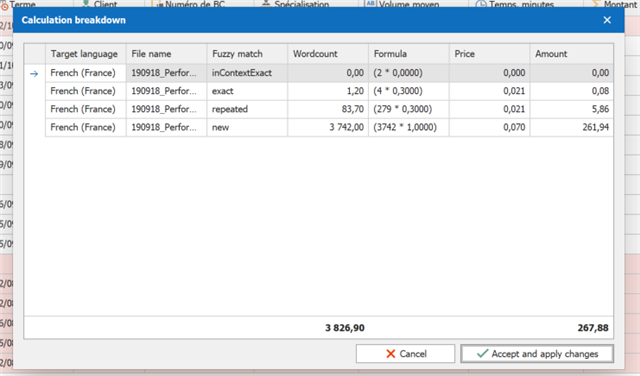
I don't know what I have messed up during the plugin setup, but the fuzzies are not taken into account during the calculation breakdown, even though they appear in the project's Analysis Report.

Moreover, when I try to edit directly in the breakdown window, no option is available to do so. Therefore, the Cancel and Apply and Save Changes buttons' only use is ironically to close the window.

Any advises and screenshots are welcome!

Many thanks.

Parents
  • Hello, Julie,

    Will try to help.

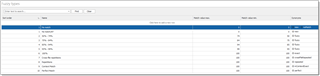
    So, example of fuzzy list:

    Take a note on the Synonyms column, which contains codes of fuzzy matches used in Studio analysis files. If yours is incorrect, try to edit them manually to reflect attached image.

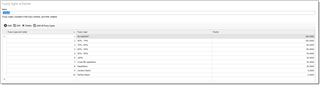
    Next, example of fuzzy scheme:

    Only fuzzy types included in a fuzzy scheme will be used during analysis import. You can choose default fuzzy scheme in global plugin settings, and in each customer editing form. Example of default fuzzy scheme in settings:

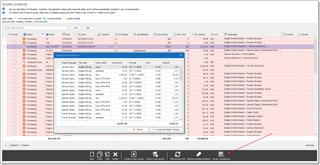
    And then, for a project with empty customer, I selected a project in the list and clicked Recalc. wordcount to view analysis contents:

    Hope something from this answer will help you to determine an issue!

  • Hello Eugene,

    Thank you for your help.

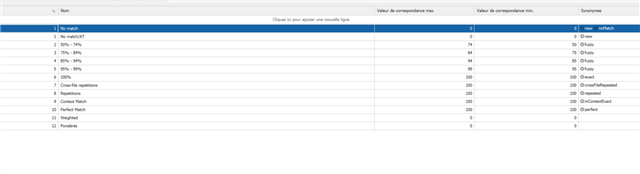
    I have checked everything and updated the fuzzy list, as some Synonyms did not match.

    Trados Studio screenshot showing a fuzzy match list with columns for match rate, source, target, and synonyms, with no visible errors.

    I made sure that everything else is the same as shown on your screenshots and in your instructions, but the fuzzies are not detected, even when I change to a default fuzzy scheme.

    Trados Studio calculation breakdown window with rows for different match types such as inContextExact, exact, repeated, and new, with a red cancel button and blue accept and apply changes button.

    So this should not be why the fuzzies are not recognized.

    emoji


    Generated Image Alt-Text
    [edited by: Trados AI at 10:39 AM (GMT 0) on 4 Mar 2024]
Reply Children