Missing many characters in xyview Table Display only when Figure EPS image precedes Table in XPP 9.4.1

We upgraded our dev and test servers from 9.2.2 to 9.4.1. 

Our tables and figures are in pickups and are ordered by the sequence they are called out in the text. The sequence could be Table 1, Table 2, Table 3, Figure 1, Table 4 or the sequence could be Figure 1, Table 1, Table 2, Figure 2, Figure 3. 

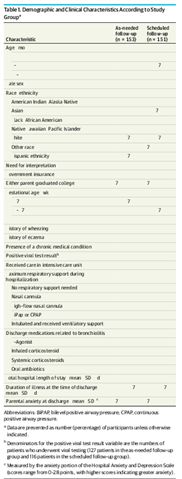
During testing of the upgrade, we discovered that in the xyview and in page text mode, when a figure precedes the first table, all the characters in the table do not display as shown below. 
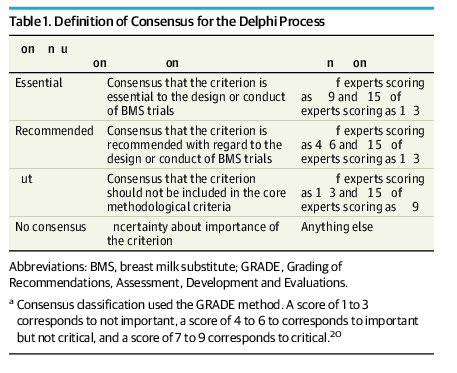
Screenshot of Trados Studio showing Table 1 with missing characters in the 'Consensus classification' column.

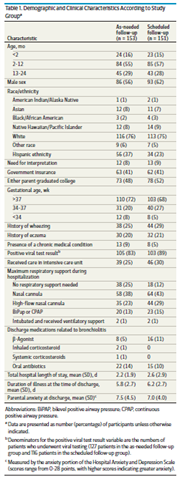
If we move the figure after the first table, close the file, and reopen it, all tables display with all characters as shown below. 
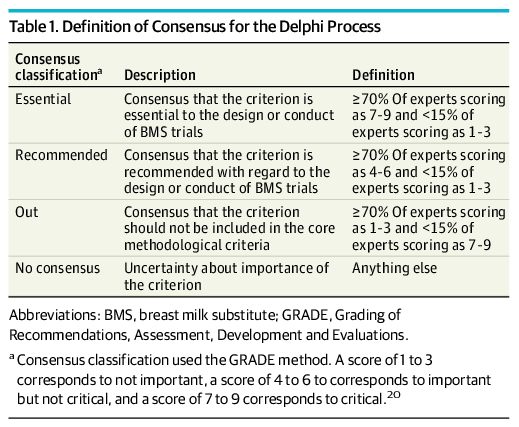
Screenshot of Trados Studio displaying Table 1 with all characters visible after reordering the figure and table sequence.

In articles where the first Table is cited before the first figure, there is not problem with the display. 

The figures are EPS images. 

If we delete the graphic block (eps image) in the Figure and leave the other parts, all characters display.  
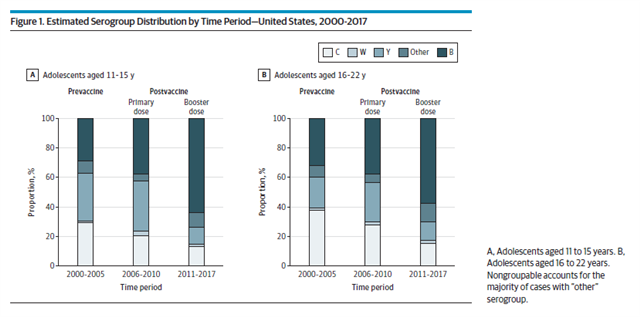
Screenshot of Trados Studio with Figure 1 displaying estimated serogroup distribution, no visible errors.

All characters always visible in the line editor. All characters are always visible in the PDF.

The problem occurs whether we use Exceed 15, Exceed Turbo X, or MobaXterm. 

The problem occurs when the file is opened on a Mac and on a PC. 

This does not happen in 9.2.2. 

We are running RHEL 7.9 on dev, test, and prod. 

We have been working with RWS technical support to resolve this but they can't reproduce it on their system.

We are going to test with the 9.4.0 version of xyview, compose, and place_ads executables and possibly later releases but that's all we've got. 

Has anyone else seen this type of behavior? Any thoughts for a solution? 

Thank you,
Jaye Mize

Director, Content Production Systems

JAMA NetworkTm

330 N Wabash Ave, Ste 39300, Chicago, IL 60611

T 312-464-4712  M 719-431-2462

jamanetwork.com


Generated Image Alt-Text
[edited by: Trados AI at 5:26 AM (GMT 0) on 5 Mar 2024]
emoji
  • Hi Jaye,

    Sure is a mystery, since we've not been able to reproduce it ourselves on our systems using your data.

    But just one caveat in regards to your mentioning that you were going to test with the 9.4.0 version of xyview/compose.

    If you're going to do this test by putting in place the 9.4.0 versions of xyview/compose onto your 9.4.1 installed systems, be aware that with the 9.4.1 release there was also a new version of XYV_STYLES/Lsyslib/_xy_sys.sde where there was a change to the expansion of the system 'ps' macro (for an enhancement to add a second argument for when using CSS) that is not compatible with the composition engine in the 9.4.0 versions of xyview/compose.

    Unless you also put in place the 9.4.0 version of the xy_sys spec, you will find that if you compose anything then any occurrences of a 'ps' macro will fail with a xymacro error. Occurrences of a '/ps' primitive will still compose okay since those won't be affected by the change to the 'ps' macro expansion made in the xy_sys spec for the enhancement.

    If you don't compose anything, and are just checking if the display is okay or not when opening the divisions with the 9.4.0 xyview then you'll be okay without doing anything for the xy_sys spec (as long as you then put back the 9.4.1 versions of xyview/compose before you do any composing again).

    Jonathan Dagresta
    RWS Group/
    XPP Development

  • Hi Jaye,

    Since you seem to have this weird font problem only when using the xyview, I would think the problem must be related to Ghostscript.
    XPP V9.2 was using V9.21 of Ghostscript, while XPP V9.4 is using the newer V9.50.

    Strangely enough you say the SDL/RWS can not duplicate this problem using your data.

    What could be interesting to see if you create a PDF using Ghostscript, if you encounter the same font problem or not.

    Also interesting to know if your XPP V9.4 installation is a fresh installation or an upgrade of an existing V9.2 system.
    If it is an upgrade, do you know if somebody did anything special or weird to your Gostscript environment in the past?

  • Hi Bart,

    I created PDFs using Ghostscript and I did not encounter the same font display problem in the PDF as in the open DIV. That's actually how I determined that it's a display (WYSIWYG) problem. I was getting all ready to open a call with SDL Technical Support and was going to make PDFs of the page in 9.2.2 and 9.4.1 and show the missing characters and they weren't missing in the PDF after all--only in the open XPP DIV. 

    It looks like corruption but it's not. It just doesn't display all the characters in the table when the DIV is open in XPP. 
    Below is a screen shot of a table in 9.4.1. There are only 7s visible in columns 2 and 3. 

    Below is the GS PDF output. 


    But if I delete the figure or move it to after the Table, close the file, and reopen, it displays just fine. 

    It was an upgrade of 9.2.2, not a fresh install. And our IT department did it in stages, first to 9.4 then to 9.4.1. There were problems initially with the install of the 9.4.1 patch but we think we got that worked out. We did not watch them do either of the installs and we don't ever plan to let that happen again. 

    I do not know if anyone did anything special or weird to our GhostScript environment. (If anyone did, it might have been you!) We will look at it to see.

  • It wasn't me!

    If it would be possible, I would do a fresh install.
    It might be a bit of work but it would be a good exercise (especially it you document it) to find out which parts of the system you have modified.
    (it also gets rid of all the unnecessary ballast you have accumulated over the years)

  • We are going to get our IT to do a rollback - then fresh install.

    What is xyview written in?

    And is there anything we should backup before or put aside before the install?

  • By fresh install, do you mean start over with a new server? If so, we did fresh installs in 2015 when we migrated to linux and in 2018 when we upgraded to linux 7.9. With RHEL, if the upgrade is major, our IT department insists on a fresh install. And it is not "a bit" of work. It's a lot of work. We had not planned to spin up a new server for this upgrade as we expected it to be minor. (<laughter/>).

  • Bill,

    Nobody from outside your organization can give a sensible answer to your 'backup' question.
    XPP system tend to be heavily customized.
    I can only hope that somebody in your organization has a roadbook on how to do a fresh install and adapt it to your environment.

  • Jaye,

    Yes  by fresh install I mean on a new server. And yes it can be a lot of work. But hey it is a very good exercise Stuck out tongue winking eye

  • "A bit" of work. That made me laugh, too. For our 8.4 to 9.4 upgrade, I have a 1262 row X 7 column spreadsheet, heavily annotated, reflecting my analysis of differences (and how to properly reconcile and update) between our mature site environment in 8.4 vs. the OOB 9.4. "A bit" of work. Not to mention that the differences between Red Hat EL5 and EL7 required a substantial amount of "re-learning" by our IT folks and myself.

  • Jay,

    Are you seriously saying that you need to perform 8834 (1262 x 7) actions to go from a freshly installed XPP installation to one that could be used as a replacement for your current system?