How can we add comment in the PDF?

I need to add a comment in the PDF and I am using the xymacro <:pdfs;NOTE;This technical note appears in red;/Color [1 0 0]><:pdfe;NOTE> as mentioned in the xypdf manual but unable to generate the comment in the PDF. Can anybody assist me to generate a comment in the PDF. I am using XPP 9.4.1.0.

  • Shahnawaz,

    Could you let us know what you are using to create the PDF?

    1. PS to PDF file using distiller
    2. PS to PDF fileusing GhostScript
    3. PDF file (aka direct PDF)
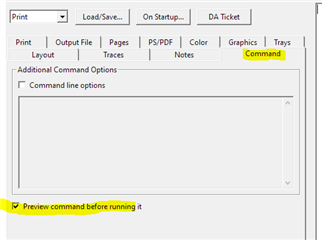
  • Oh and while you are there you might as well tick the 'Preview command before running it' box in the Command tab and add a screenshot of the next box you get.
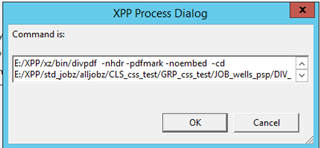
    Like that we would see all the switches you have used (or not used) at output time

    Trados Studio screenshot showing the Command tab with an unchecked 'Preview command before running it' box.

    emoji


    Generated Image Alt-Text
    [edited by: Trados AI at 5:19 AM (GMT 0) on 5 Mar 2024]
  • Specifically check that you are using the -pdfmark option in the command, which in the GUI is the "Use PDF markup" checkbox in the PDF options section of the PS/PDF tab.

    Jonathan Dagresta
    RWS Group/
    XPP Development

  • XPP Process Dialog window with a command line input field containing a file path and various command flags.

    emoji


    Generated Image Alt-Text
    [edited by: Trados AI at 5:19 AM (GMT 0) on 5 Mar 2024]
  • Shahnawaz,


    I did some testing and It looks like the Direct PDF does not support the <:pdfs;NOTE...> syntax.
    My test file came out without notes when using Direct PDF with the pdfmark option set, but came out with notes when going through the 'PS to PDF file using distiller' route.

    From reading the xyPDF manual it is not entirely clear to me whether this is a bug or simply not supported.
    The manual speaks about supporting the <:pdfs> and <:pdfe> constructs in order to build bookmark and annotations the old fashioned way.
    The manual is also very clear that the <:pdfs;GEN> macros are not supported.
    But it is not clear what happens to all the other <:pdfs> and <:pdfe> macros.
    (hopefully SDL engineering will tune in here with the correct answer...)

    But anyhow even if this is a bug, you will have to open a support ticket and wait for the fix to come.
    And of course you do not have the time to wait as you want a solution now Stuck out tongue winking eye

    The easy solution is to not use the Direct PDF option but go through the PS to PDF file route.

    But there is also an alternate solution. Here is what you can do.
    I am assuming since you are still using the <:pdfs> and <:pdfe> macros that this is a job using the classic IF/XX setup but hopefully it is an XML job.
    If that is the case, then the solution is to simply create an extra css file that will only contain the necessary pdfmark things but using the CSS syntax.
    My test division was using the style 'xybase2'.
    I create a CSS file called xybase2.css and in that file I just put:

    @import url('xpp.css');

    note {
    -xpp-pdf-annotation: "type={note} text={text as defined in CSS}";
    }

    and when I printed this with Direct PDF and -pdfmark all was well and wherever the element note was sitting on the page I did get a PDF note.

    Hope this helps...

  • And if you want the text to be variable, you will have to stick it into an attribute (e.g. @notetext) on the element <note> and in the CSS define note as:

    note {
    -xpp-pdf-annotation: "type={note} text={attr(notetext)}";
    }

  • Thanks Bart for the quick response. It is really helpful for now.

  • I just checked the code and for a :pdfs NOTE the divpdf (Direct to PDF) program is creating a "Text annotation", and it appears that you also need to be specifying PDF/UA output (-pdfua option or in the GUI it is the "Generate: PDF/UA" checkbox).

    With XPP 9.4 we added the -pdfba option ("Generate: Bookmarks/Annotations Only" in the GUI), in order not to have to use the full blown PDF/UA setup in order to just get bookmarks and annotations.

    And I see that when using -xpp-pdf-annotation with CSS to create annotations, the code is processing the annotations if either the -pdfua or the -pdfba option is enabled.

    But it seems we missed adding to process the :pdfs NOTE macros if the -pdfba option is enabled, and it is still requiring the -pdfua option in order for them to be processed.

    So, please (someone) open a support ticket on this: divpdf is not processing :pdfs NOTE macros if the -pdfba (and -pdfmark) option is specified

    This is an "easy" fix, so the turnaround time for getting a hotfix should be quick (and thank you for already being on the latest release and service pack).

    In the meantime, using the -pdfua (PDF/UA) option is another workaround (in addition to the one Bart suggested) if you can use it w/o too much trouble. Bart's suggestion is probably easier as there is quite a bit of setup to use the PDF/UA option.

    Jonathan Dagresta
    RWS Group/
    XPP Development

  • Jonathan,

    Are you saying that one should also check the -pdfba option as well as the -pdfmark option (assuming the fix is in place) in order for the <:pdfs:NOTE> things to work?

    Shouldn't checking the -pdfmark option be enough?

    The way I understand things (and please correct me if I am wrong)

    - pdfmark: this will create a PDF in which all the pdfmarks (= <:pdfs> and <:pdfe> codes except for <:pdfs:GEN>) will be used
    - pdfba; this will create a PDF in which all the CSS -xpp-pdf-xxxx properties will be used as found in the CSS file (I guess that in this case the -xpp-pdf-tag things are dropped?)
    - pdfua: this will try to create a Universal Accessible PDF using the CSS -xpp-pdf- tag properties

    So when one switches on the -pdfmark option, shouldn't the <:pdfs:NOTE> be present irrelevant if one used the -pdfua or -pdfba options or not?

    PS: I will open up a ticket