Is there an option on print command so that the doc can be checked with a script first and not to print if it fails?

Hi there,

Just wonder if there is an option on xpp print command so that a simple script is run first to check certain syntax before it is printed. If it fails it just does not print. The problem we have is users always forget to run the tool to check. Since they need to generate the pdf at the end (i.e. xpp print command) just wonder if we could run the script just before it prints. If there is an error we can stop there and notify the user about the error.

Any suggestion is appreciated. Thanks. Kwan


  • Kwan,

    Yes there is an option that will help you. (and I do not think that it is documented)

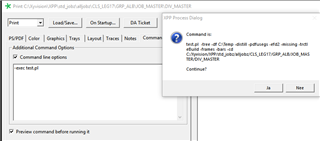
    Just add the "-exec your_script" option to the command line option window.
    As you can see from the attached screenshot the your_script will be run instead of the normal psfmtdrv program.
    (in the screenshot I used test.pl instead of your_script)

    Trados Studio Print Command Options dialog box showing the addition of '-exec test.pl' in the Command line options field with a warning message box overlaid asking to confirm the action.

    In your "your_script" you will be able to test whatever you want to test.
    When the testing is done, your "your_script" will have to excecute the psfmtdrv command, otherwise nothing will get printed.
    This means that in your "your_script" you will have to read all of the switches and options that are sitting on the command line and then pass them through to the psfmtdrv call.

    "your_script" can be anything that is executable and can be placed anywhere. Just be sure to pass the full path to it in your -exec option.

    Good luck

    Bart

    emoji


    Generated Image Alt-Text
    [edited by: Trados AI at 5:08 AM (GMT 0) on 5 Mar 2024]
  • Thanks Bart. It answered my question. My next question is how I can "read all of the switches and options that are sitting on the command line"?
  • Well the answer to your question depends on the language you use to write your script/program.

    As you could see in the screenshot in my original reply, all options and switches one selects through the print interface will appear on the command line that will start your script/program. (for a complete list of all possible options/switches do a "xyhelp psfmtdrv")

    If you write your script/program in perl, the command line options live on @ARGV. There is a pretty good article written by a reliable and modern source (2 problematic things with most of the things you find about perl on the internet) here:
    Processing command line options


    Bart

  • Thanks again Bart. Yes I use Perl and used the @ARGV before. I asked the question because I did not realise it was just the same. I kept wondering how I could capture the command line showing in the command preview! Thanks for the patience and I guess I should be able to get the job done! Really appreciate for your help ..