
 Translate


When the original segment is entirely in italics, bold or other formatting, the only way I know to remove that formatting is to click in the bottom right corner of the QuickInsert sub-tab, as shown below. Since the extra clicks can become very time-consuming in some cases, it would be very useful to have shortcuts (icons or keyboard) for performing the exact same function.
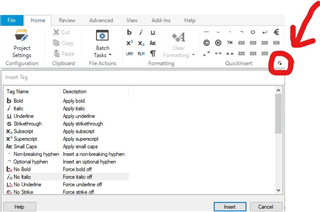
Also, it is so well hidden that I first thought it was impossible to remove the formatting in such cases, which also tends to demonstrate that adding shortcuts for that would be a great idea.

Top Comments
-

Angela Sigee
-
Cancel
-
Vote Up
+2
Vote Down
-
-
More
-
Cancel
Comment-

Angela Sigee
-
Cancel
-
Vote Up
+2
Vote Down
-
-
More
-
Cancel
Children