Translate


Category
Trados Studio 2026 Release — User Profiles / Settings
Description
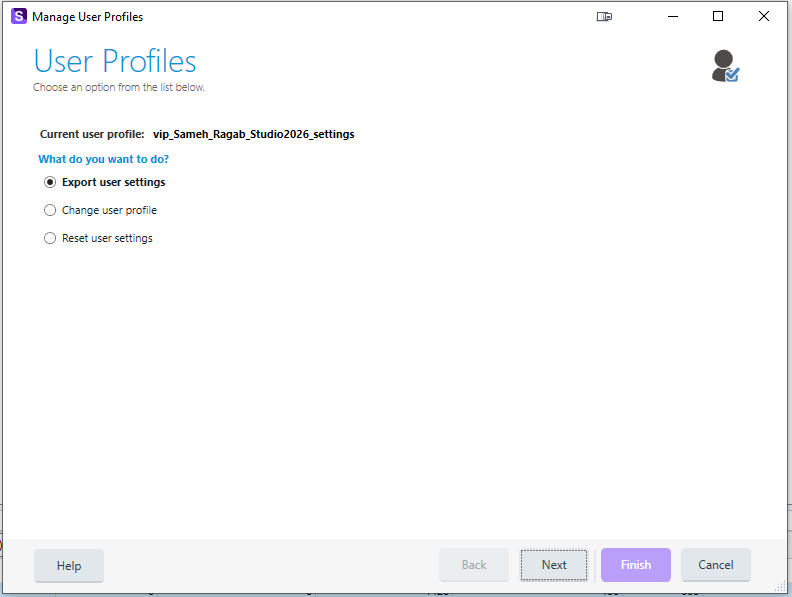
The Manage User Profiles wizard (File > Setup > Manage User Profiles) only offers three options:
- Export user settings
- Change user profile
- Reset user settings
There is no option simply labeled "Import settings." Based on the documentation, the closest equivalent is "Change user profile," which lets you Browse to a saved .sdlprofile file — but this does not import the file's settings into your current profile. It replaces your entire active profile with the contents of that file and it is not even working correctly as I lost my settings twice and could not restore them from that backup (from the exported settings file). Very very frustrating I must say especially for someonoe how has a lot of plugin ribbon customizations! The wizard does offer to back up your existing settings first, but this is still a full swap, not a merge.
This is not clearly communicated in the dialog itself. A user who wants to bring in a saved settings file (for example, one exported from another machine, or from an earlier version of Studio) has no way to guess that the only path to doing so is through an option labeled "Change user profile," and no way to tell from the UI that this action is destructive rather than additive.
Impact on me personally
I lost my ribbon customization (all my custom plugin buttons and their layout) twice while trying to bring in a previously exported settings file this way. Even when I selected the option to back up my existing settings first, the result was a profile that no longer matched what I had — I had to manually redo my ribbon layout for every one of my custom plugins afterward. This was avoidable if the tool had behaved the way its available options suggest, or if there had been a true "Import" option that adds/merges settings rather than replacing the whole profile.
Suggested improvement
- Add a fourth, explicitly labeled option to the User Profiles page: "Import settings."
- Make its behavior match its name: import/merge the settings from a chosen
.sdlprofilefile into the current profile, rather than discarding the current profile and replacing it wholesale. - If a full profile replacement is still needed for some workflows, keep "Change user profile" as-is, but make the destructive nature of that action much clearer in the wizard itself (e.g., a clear warning that this replaces all current settings, not just the ones present in the imported file).
- At minimum, until the above is implemented, please update the in-product wording and the online documentation so it's obvious to users that "Change user profile" is the only way to bring in settings from a file, and that doing so is a full overwrite, not an import.
Why this matters
Trados Studio users customize a lot of things over time — ribbon layouts, plugin arrangements, keyboard shortcuts, default project settings. Losing all of that because a well-intentioned attempt to "import" a settings file turned into an unexpected full reset is a frustrating and completely avoidable experience. A straightforward, honestly-labeled Import option (with a real merge, not an overwrite) would prevent this for other users too.
Thank you for considering this — happy to provide more detail or additional screenshots if useful.
Sameh Ragab