

New

Introducing TWAS Apps — including two completely free tools: TWAS Segment Work & TWAS Recall

Hello everyone,

I'm Sameh Ragab — a senior Arabic translator, ISO 17100 Lead Auditor, and UN / World Bank registered translation consultant, with over 35 years in this industry and hands-on experience training translation teams across 20+ countries.

Over the years using Trados Studio (all versions since Trados 5.1!!), I kept dreaming of streamlining so many things inside Trados Studio: to have a reliable way to tell which files I had actually worked on in a large project, or to develop a way to tag segments with my own workflow statuses, or have a clean way to update a TM using only the segments I had truly approved. Nothing built into Studio solved these cleanly, so I started building my own tools — first just for myself, then polished enough to share with the community.

That's how TWAS (Translation Workflow Automation Suite) came to be: 17 focused applications covering CAT editing, AI assistance, terminology engineering, QA, privacy, packaging, and resource intelligence. Every one of them exists because it solved a real problem I lived through — not a feature someone thought would look good on a list.

Today I'd like to introduce two of them that are completely free to use:

Dividers️ TWAS Segment Work
Add your own private workflow statuses to Studio segments, filter by them instantly, clear them in bulk, and update your translation memory using only the segments you've actually approved — by status, by segment range, or both, with a confirmation step before anything gets written. No more guessing which segments are truly TM-ready.

Clock4 TWAS Recall
Ever opened a large Studio project with no idea which file you last touched, because Windows' "date modified" becomes useless the moment Studio re-saves everything on open? TWAS Recall fixes that. It tracks genuine work activity per file, lets you sort by when you actually worked on something, and gets you back to the right file in seconds instead of guessing.

A quick note on "free": both apps are free of charge, but they still require a license file tied to your machine, exactly like every other TWAS app. This isn't a paywall — it's simply how I keep track of who's using what, so I can keep supporting and improving these tools responsibly. Getting a license takes one short email.

These two are just a small part of the full suite. The rest — including the AI-Assisted CAT Editor, Bilingual Converter, Termbase Migrator, Universal Sanitizer, Concordance Bridge, TagWorks, Preflight, TTS Converter, Anonymizer, Prompt Manager, and more — are all listed with full details here:

Point right https://twas.arabiana2008.workers.dev/

If you'd like a license (free or paid) or a personal walkthrough of any tool, I'm happy to help:
E-mail arabiana2008@gmail.com — please include your machine UUID (run wmic csproduct get UUID in Command Prompt and paste the result)
Iphone WhatsApp: +20 100 196 9120

I built these tools because I needed them myself, every single day, across decades of real translation work. I hope they save you the same hours they've saved me.

Warm regards,
Sameh Ragab
ISO 17100 Lead Auditor · UN / World Bank Registered Translation Consultant


TWAS-Recall+SegmentWork-2024-2026.zip

Parents
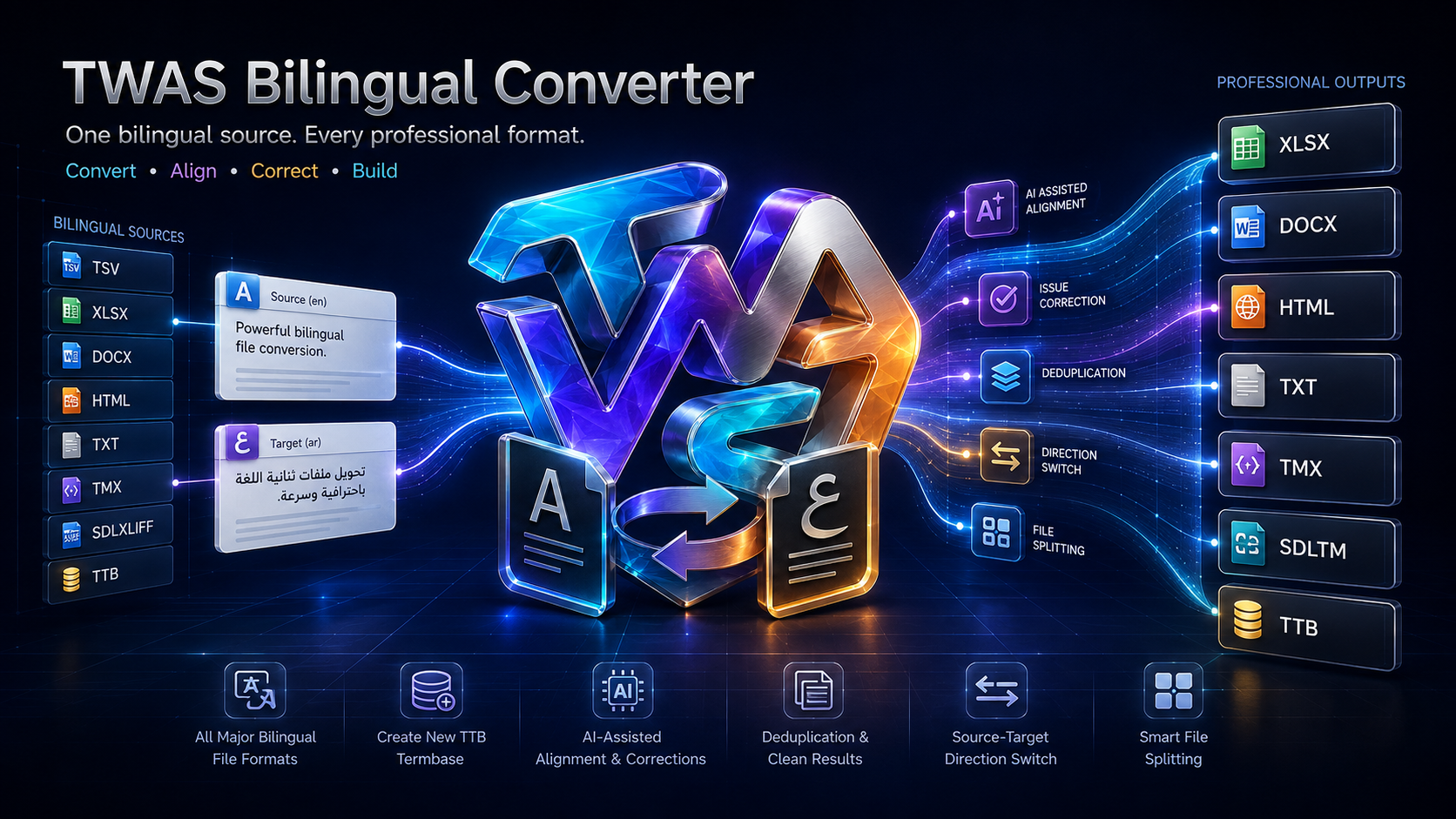
  • See below the actual TWAS Bilingual Converter UI. I believe I built this one to be a converter on steroids!! I am sure you would love using it as much as I do, each and every single day. TWAS Bilingual Converter does not merely change file extensions. It turns finished translations, legacy resources and fragmented bilingual data into whatever the next person, platform or stage of the workflow actually needs. Below are some examples of use cases!! Workflows are changing my dear colleagues and we have to revolve and adapt with them!! 

    For translators

    • Convert SDLXLIFF or other bilingual files to HTML before delivery, then ask AI to perform a final fatal-error audit while seeing source and target together.
    • Convert bilingual files to Excel for a clean, filterable review of source, target, segment order and recurring problems.
    • Export the target text only when a client needs clean translated content without the source column or CAT-tool metadata.
    • Convert a bilingual CAT file into Word so it can be reviewed by a subject-matter expert who does not use Trados Studio.
    • Generate an RTL Word document for Arabic, Hebrew, Persian or Urdu review instead of manually repairing document direction afterward.
    • Produce an RTL HTML review file that displays Arabic and other right-to-left languages naturally in a browser.
    • Convert a bilingual file to tab-delimited TXT or TSV for use with AI tools, scripts, databases or terminology-processing workflows.
    • Switch source and target directions instantly when conducting reverse review, back-translation or bilingual reconciliation.
    • Split a very large project into manageable files of a specified number of segments before sending it to AI or human reviewers.
    • Recombine bilingual content into practical review formats without giving external reviewers access to the original CAT project.
    • Convert translations into TMX to retain valuable work in a vendor-neutral translation-memory format.
    • Create an SDLTM translation memory directly from bilingual source material for immediate use in Trados Studio.
    • Build a new Studio 2026 TTB termbase from bilingual terminology without manually recreating every entry.
    • Extract useful bilingual material from old Word, Excel, HTML or tabular resources and turn it into reusable TM or termbase assets.
    • Deduplicate accumulated bilingual content before adding it to a TM, termbase, RAG repository or AI knowledge base.
    • Convert bilingual data into a consistent format before running terminology extraction, consistency analysis or linguistic QA.

    For editors and reviewers

    • Convert CAT files to HTML for a clean browser-based review requiring no specialist translation software.
    • Give reviewers a bilingual Word document with source and target displayed in an accessible, familiar environment.
    • Send an Excel version to reviewers who need to filter, classify, comment on or assign individual segments.
    • Divide a huge translation into smaller batches so several reviewers can work on clearly defined portions.
    • Use AI-assisted issue correction to identify or repair suspicious bilingual entries, with the option to review changes manually.
    • Load a dedicated client prompt through Prompt Manager so the AI review follows the client’s terminology, style, prohibited-language and severity rules.
    • Append project-specific instructions without changing the reusable master prompt.
    • Detect untranslated segments, omissions, duplicated translations, source leakage and potentially catastrophic meaning errors through an AI-ready bilingual export.
    • Compare the same content in different presentation formats—HTML for visual reading, Excel for filtering and TMX for structural inspection.
    • Reverse source and target when performing back-translation assessment or checking whether the translation accurately reconstructs the original meaning.
    • Convert text into a format suitable for side-by-side review during arbitration between translator and reviser.
    • Produce lightweight bilingual evidence files that can be archived with review records without retaining an entire CAT-tool project.

    For project managers

    • Convert a translator’s CAT-tool deliverable into an accessible review package for clients or internal stakeholders who own no CAT software.
    • Standardize files received from different translators into one common review format.
    • Convert bilingual resources from one ecosystem into neutral formats that can be reused across Trados, other CAT tools, AI systems and internal workflows.
    • Generate several outputs during one conversion—for example, Excel for the PM, HTML for QA, TMX for archiving and SDLTM for production.
    • Split a 50,000-segment project into predictable 2,000-segment review packages without manually copying and pasting content.
    • Prepare target-only text for DTP, publishing, website import or downstream content teams.
    • Create TMX or SDLTM assets from completed bilingual projects before closing and archiving them.
    • Build a client-specific TTB termbase from an approved bilingual glossary for use in Studio 2026 projects.
    • Deduplicate merged resources before distributing them to translators, preventing inflated counts and conflicting repetition.
    • Review the conversion log to confirm output locations, processing progress, fallbacks and errors.
    • Estimate AI costs before initiating alignment repair or issue correction, making API expenditure visible and controllable.
    • Convert confidential project data locally into a carefully selected format before deciding what—if anything—should be shared with an external AI service.
    • Create simplified client-review files without exposing project packages, reference resources, internal metadata or production infrastructure.

    For terminologists and localization engineers

    • Turn bilingual Excel, TSV, TXT, HTML or other supported resources into the new TTB termbase format used by Studio 2026.
    • Modernize legacy bilingual terminology collections so they remain usable after the transition from SDLTB to TTB.
    • Convert approved terminology into multiple distribution formats for translators, reviewers, developers and external stakeholders.
    • Deduplicate terminology before termbase creation to reduce repeated or conflicting entries.
    • Reverse language direction when repurposing a bilingual glossary for the opposite translation direction.
    • Convert translation memories into tabular formats for terminology mining and corpus analysis.
    • Convert spreadsheet glossaries into TMX or SDLTM when the entries should function as bilingual reference segments rather than terminology records.
    • Prepare normalized bilingual files for lexical indexing, semantic indexing or RAG ingestion.
    • Split very large bilingual corpora before embedding, indexing or processing them through APIs with context or token limits.
    • Use client-specific prompts to check terminology correspondence, inconsistent equivalents and prohibited translations.

    For AI-assisted translation workflows

    • Convert SDLXLIFF to HTML and ask AI: “Report only fatal errors—omissions, additions, reversals, numbers, names, dates and meaning distortions.”
    • Convert files to Excel when the AI or analysis system requires consistent source and target columns.
    • Split huge bilingual files into safe processing batches that fit model context limits.
    • Adjust the chunk size to control how much content is processed in each AI request.
    • Estimate semantic-indexing, alignment-repair or issue-correction costs before spending API credits.
    • Align two monolingual TXT files to begin recovering bilingual data from separately maintained source and target documents.
    • Repair imperfect alignment through an AI-assisted workflow, or correct it manually when human control is preferable.
    • Use a powerful reusable QA prompt and append instructions unique to the current client or subject field.
    • Deduplicate data before building embeddings or RAG indexes, reducing wasted tokens and repetitive retrieval results.
    • Convert approved translations into a clean bilingual corpus suitable for future AI grounding.

    Particularly powerful real-life chains

    • SDLXLIFF → HTML → fatal-error AI audit → corrected delivery
    • SDLXLIFF → Excel → reviewer comments → final correction
    • Bilingual Excel → TTB → Studio 2026 terminology verification
    • Completed project → TMX + SDLTM + HTML archive
    • Two monolingual TXT files → alignment repair → TMX
    • Large TMX → deduplication → file splitting → AI/RAG indexing
    • Bilingual Word table → RTL HTML → Arabic client review
    • Legacy glossary → deduplication → direction switch → new TTB
    • Mixed project resources → standardized TSV → linguistic analysis
    • Large bilingual corpus → controlled chunks → AI issue correction → reusable TM


  • I put them all on the RWS Appstore. See below:

Comment Children
No Data