Specialization not loading in Xopus Create

Finished my specialized  Schemas and DTDs, and am unable to open the new topic in create. I have validated the Schemas, the only error I can see in Create is :

<error>
  <status>500</status>
  <code>-1</code>
  <message>Object reference not set to an instance of an object.</message>

Which doesn't help, would anyone know a way to troubleshoot this type of issue?

Parents
  • Hi Akheil - I'm afraid there is little information here... can you explain more elaborately what you do, what your end result was and what you expected it to be?

    It always a good idea to mention "exact" software versions of the components involved. A look in the log files also could give you a hint, something worth sharing.

    Is this case related (regarding catalog, DTDs and schemas or even system) to Add topic ref to a map in XMetal 9 (community.sdl.com/.../34037
  • Hi Dave,
    We are currently running LiveContent 2014 SP2, with Create and Internal Reach. I created two specializations one from Concept and another with learningAssessment. Topics created off of the concept open up just file in Create, but the ones with learningAssessment yield the error mentioned in my post above.
  • The best way to troubleshoot these kinds of problems is to open up the network tab of the developer tools of your browser. You will see one of the requests failing. It will be interesting to know which exact request that is, and what is in the response body.
  • Hi Fredrik, I ran the developer tools in chrome, and didn't see any failures.
  • Akheil, can you post what you did get from the developer tools?
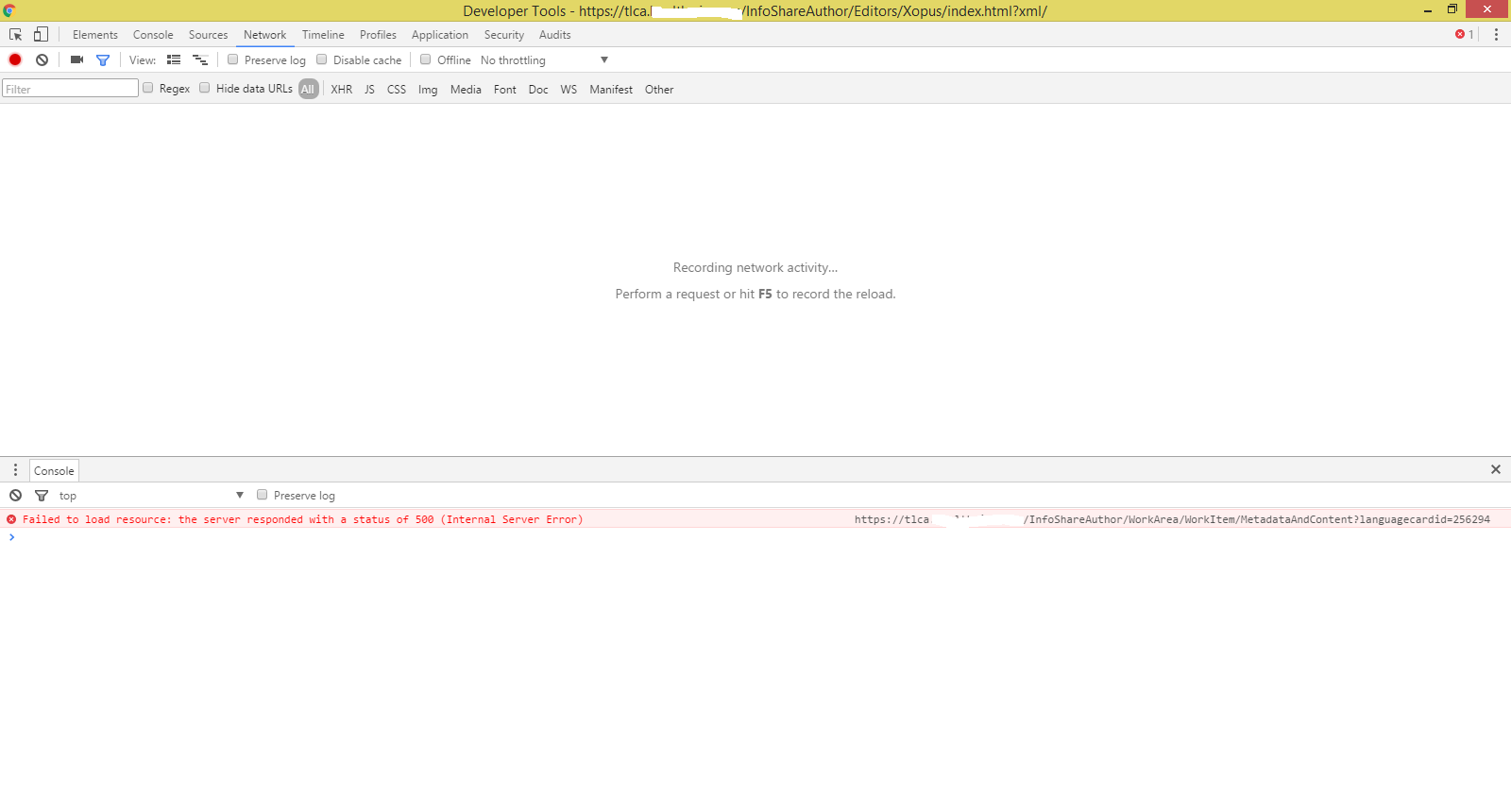
  • Hi Akheil, your screenshot does show the failure, we now know that the HTTP 500 error is returned by https://.../InfoShareAuthor/WorkArea/WorkItem/MetadataAndContent?languagecardid=256294

    As you know an HTTP 500 error means something is seriously wrong (system down, wrong configuration,... or some unexpected error). The above Url is from the LiveContent Architect (=InfoShare) part of the software. I would advise to look in the logfiles on \InfoShare\Data\Logs\... clean them and see what you get when you reproduce your problem.
  • Hi Dave,
    The log is as follows, thank you for you help on this matter:
    15:16:02.4586 Error 23 00187 a:F:HW\ajain /InfoShareAuthor/WorkArea/WorkItem/MetadataAndContent?languagecardid=256294 Trisoft.InfoShare.Client.Remote.ContentLoader.ProcessRequest []
    System.Xml.XmlException: Name cannot begin with the '|' character, hexadecimal value 0x7C. Line 777, position 9.
    at System.Xml.XmlTextReaderImpl.Throw(Exception e)
    at System.Xml.XmlTextReaderImpl.DtdParserProxy.System.Xml.IDtdParserAdapter.Throw(Exception e)
    at System.Xml.DtdParser.Throw(Int32 curPos, String res, String[] args)
    at System.Xml.DtdParser.ScanQName(Boolean isQName)
    at System.Xml.DtdParser.GetToken(Boolean needWhiteSpace)
    at System.Xml.DtdParser.ParseElementMixedContent(ParticleContentValidator pcv, Int32 startParenEntityId)
    at System.Xml.DtdParser.ParseElementDecl()
    at System.Xml.DtdParser.ParseSubset()
    at System.Xml.DtdParser.ParseExternalSubset()
    at System.Xml.DtdParser.ParseInDocumentDtd(Boolean saveInternalSubset)
    at System.Xml.DtdParser.Parse(Boolean saveInternalSubset)
    at System.Xml.DtdParser.System.Xml.IDtdParser.ParseInternalDtd(IDtdParserAdapter adapter, Boolean saveInternalSubset)
    at System.Xml.XmlTextReaderImpl.ParseDtd()
    at System.Xml.XmlTextReaderImpl.ParseDoctypeDecl()
    at System.Xml.XmlTextReaderImpl.ParseDocumentContent()
    at System.Xml.XmlTextReaderImpl.Read()
    at System.Xml.XmlLoader.LoadDocSequence(XmlDocument parentDoc)
    at System.Xml.XmlLoader.Load(XmlDocument doc, XmlReader reader, Boolean preserveWhitespace)
    at System.Xml.XmlDocument.Load(XmlReader reader)
    at Trisoft.InfoShare.Content.XmlContent.ToXmlStream(Stream stream, XmlResolver xmlResolver, String baseUri)
    at Trisoft.InfoShare.Content.ContentFactory.Create(XmlReader reader, Connection connection)
    at Trisoft.InfoShare.Content.ContentFactory.CreateContent(XmlReader reader, Connection connection)
    at Trisoft.InfoShare.Content.ContentFactory.CreateContent(ObjectXml data, Connection connection)
    at Trisoft.InfoShare.Client.Remote.ContentLoader.ProcessRequest(Connection connection, String id, Int64 languageCardId)
    ContentProvider.GetRemoteContent => ContentLoader.Read => ContentLoader.ProcessRequest
  • Hi Fredrik,
    Here is the failing request from the developer tools:-
    Uncaught բChash: Objectref: "base-attribute-extensions"__proto__: Object__defineGetter__: __defineGetter__()__defineSetter__: __defineSetter__()__lookupGetter__: __lookupGetter__()__lookupSetter__: __lookupSetter__()constructor: Object()hasOwnProperty: hasOwnProperty()isPrototypeOf: isPrototypeOf()propertyIsEnumerable: propertyIsEnumerable()toLocaleString: toLocaleString()toString: toString()valueOf: valueOf()get __proto__: __proto__()set __proto__: __proto__()location: "dcontent2016.healthwise.org/.../xs:attributeGroup[@name = "title.attributes"]/xs:attributeGroup[1]"message: "undefinedSchemaNameInRef"__proto__: Objectconstructor: բC(code,ҟ,hash)toString: toString()Ǎ: Ǎ(message,location)Ǎ$toString: toString()բC: բC(code,ҟ,hash)__proto__: Object
Reply
  • Hi Fredrik,
    Here is the failing request from the developer tools:-
    Uncaught բChash: Objectref: "base-attribute-extensions"__proto__: Object__defineGetter__: __defineGetter__()__defineSetter__: __defineSetter__()__lookupGetter__: __lookupGetter__()__lookupSetter__: __lookupSetter__()constructor: Object()hasOwnProperty: hasOwnProperty()isPrototypeOf: isPrototypeOf()propertyIsEnumerable: propertyIsEnumerable()toLocaleString: toLocaleString()toString: toString()valueOf: valueOf()get __proto__: __proto__()set __proto__: __proto__()location: "dcontent2016.healthwise.org/.../xs:attributeGroup[@name = "title.attributes"]/xs:attributeGroup[1]"message: "undefinedSchemaNameInRef"__proto__: Objectconstructor: բC(code,ҟ,hash)toString: toString()Ǎ: Ǎ(message,location)Ǎ$toString: toString()բC: բC(code,ҟ,hash)__proto__: Object
Children
No Data