
Download issue regarding Get files saved as attribute values API endpoint

Hi,

I am using the Get files saved as attribute values API endpoint, and I know I'm using it correctly, because most custom attribute files are getting downloaded successfully.

The problem is that some custom attribute files cannot be downloaded through the WorldServer API, while other custom attribute files download without any problems, and I couldn't find the reason behind it.

The ones that are not getting downloaded give the following error response:
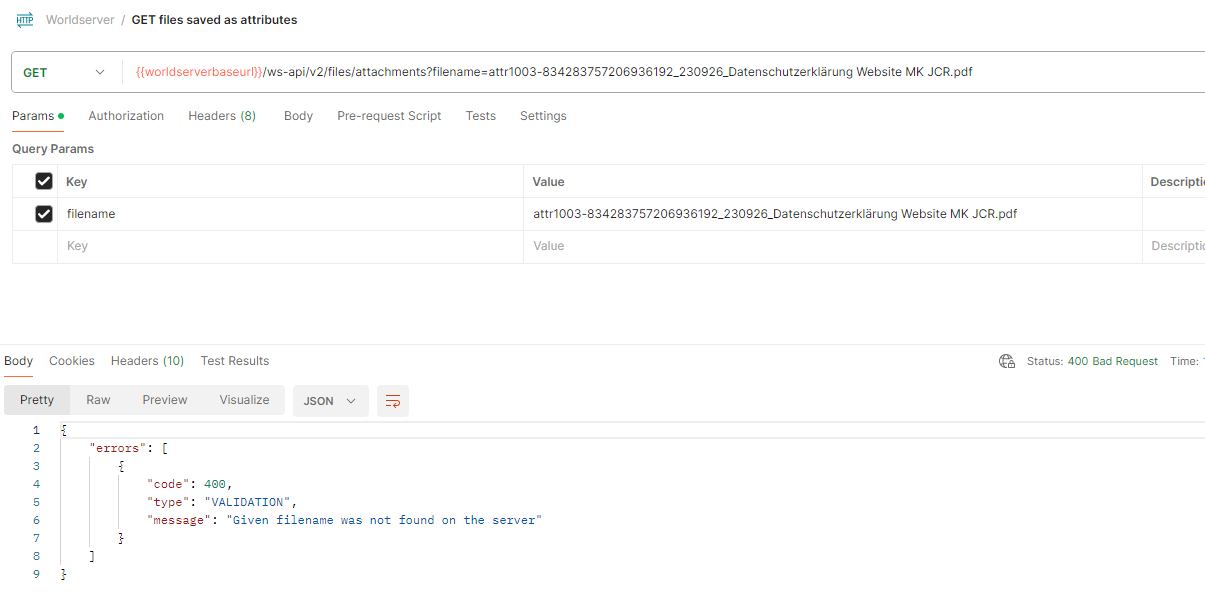
Screenshot of Trados Studio's WorldServer API error message displaying '400 Bad Request' with a validation error stating 'Given filename was not found on the server'.

I have a hunch it may be because of the German umlaut character or some other characters in the filename, but I did not manage to find out how to escape or represent those. The files download perfectly on the UI.

Thanks in advance!

István


Generated Image Alt-Text
[edited by: Trados AI at 4:27 PM (GMT 0) on 14 Mar 2024]
  • Hi István,


    Unfortunately I am not able to reproduce this on my environment. I used a filename with spaces and german characters („german Charactersäö.tbx”), I have the response as expected.

    What WorldServer version are you using? I think there were some adjustments in this area in newer versions.


    You can try the following to further debug your issue:

    1. Use the API tool to upload a file and use the parameters returned by the API to make sure you have the proper naming as parameters.

    Upload API documentation: https://docs.rws.com/994354/649992/worldserver-11-8-developer-documentation/upload-assets

    Using the response body, execute a GET for the uploaded file.

    You can try to do the get call having as filename the “internalName” first, and then the filename property from the “url“ field – see if the behavior is different.

    https://docs.rws.com/994354/646234/worldserver-11-8-developer-documentation/get-information-about-a-specific-asset


    The GET file method should be executed successfully, this is the expected behavior.

    You can try the same for the upload/get attachments REST APIs as well, the behavior should be similar.


    1. Investigate the request/response from UI side.

    As you mentioned your attachment can be downloaded properly from UI, you can use developer tools to investigate the request sent and try to do the same in your API tool.


    1. You can also check the name of your file on the disk to see how it was saved.


    Please let me know if any of these steps helped.


    Thank you,

    Anca