 Translate


Hello all,
Is there a standard way to turn an exported file type settings file (.sdlftsettings) into a project template (.sdltpl)? Ideally via the Project Automation API, rather than hand-editing the XML. Thanks!

Hello all,
Is there a standard way to turn an exported file type settings file (.sdlftsettings) into a project template (.sdltpl)? Ideally via the Project Automation API, rather than hand-editing the XML. Thanks!
Hello Stelios,
there isn't even a non-standard way. These two simply serve entirely different purposes.
A .sdlftsettings defines how to handle files of type xyz, nothing more, nothing less. A .sdltpl defines certain general properties of a project, such as source language, target langs, which translation memories to use, which termbases - and of course which file types.
So what you need instead is a way to have a project template with this file type setting included, right?
That is quite easy. You can
a) set up a simple project with one file, with this sdlftsettings imported. Once the project is created, you simply "create project template" using the button in the "Tasks" ribbon. You now have a .sdltpl with this sdlftsettings included.
b) you modify an existing sdltpl by clicking the menu "File => Setup => Project templates". Open or import your sdltpl, go to file types => import, import your sdlftsettings, close your project settings. It is now saved.
Does this help?
Best regards,
Andreas
Hello Stelios,
there isn't even a non-standard way. These two simply serve entirely different purposes.
A .sdlftsettings defines how to handle files of type xyz, nothing more, nothing less. A .sdltpl defines certain general properties of a project, such as source language, target langs, which translation memories to use, which termbases - and of course which file types.
So what you need instead is a way to have a project template with this file type setting included, right?
That is quite easy. You can
a) set up a simple project with one file, with this sdlftsettings imported. Once the project is created, you simply "create project template" using the button in the "Tasks" ribbon. You now have a .sdltpl with this sdlftsettings included.
b) you modify an existing sdltpl by clicking the menu "File => Setup => Project templates". Open or import your sdltpl, go to file types => import, import your sdlftsettings, close your project settings. It is now saved.
Does this help?
Best regards,
Andreas

Thank you for your reply. The problem is that, to my knowledge, the .sdlftsettings can't be passed to the project object of the Trados API in C#. The contructor can only use an optional path pointing to a .sdltpl file. So, in my case my .sdlftsettings can change on each workflow execution, so the manual approach can't work. Do you have a solution for this or am I missing something regarding the API specs? Thank you.

The constructors in C# can only create project based on existing templates. So the normal approach would be to create all required project templates first.
However, you are talking about the one and same project needing different fiel type settings depending on the workflow?
Changing file type settings in the midst of a project is not something I would ever have considered. Do you need to replace one setting by a different one during translation?
If not, I would simply add all required settings into that one project template. If you actually need to replace or dynamically add a setting while the project is already in production, you are in for a treat.
You will have to work around the API. Unload the project, manipulate the sdlproj file itself, then reload the edited project.
First you will have to clone this node from the sdlftsettings:
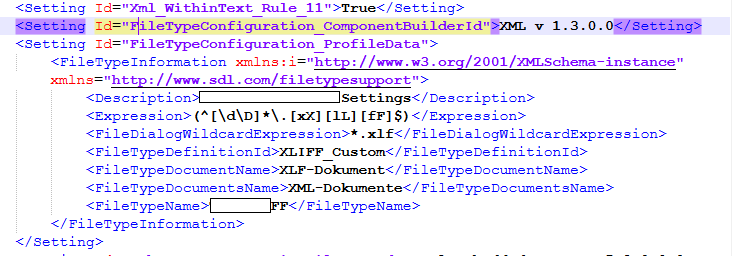
...and in the sdlproj file, create a new "FileTypeManagerConfigutationItem", with child "<Enabled>True</Enabled>", and insert the cloned node with namespace prefix "d3pl":
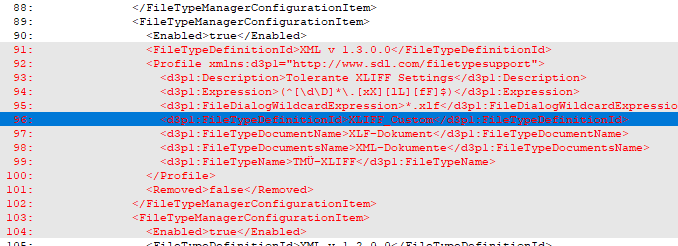
...and then some more, as you still need the settings themselves. Best you create a simple template, then one with the setting imported, compare the two to find the nodes you need.
Best regards,
Andreas