unhandled SEHException

Hi there

I want to access our Multiterm data via the API. I have written a few lines of code in C#, but now I run into an exception that I cannot seem to tackle.

Here is a snippet:
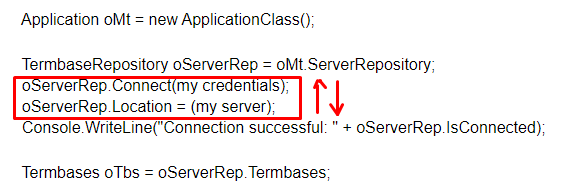
            Application oMt = new ApplicationClass();

            TermbaseRepository oServerRep = oMt.ServerRepository;
            oServerRep.Connect(my credentials);
            oServerRep.Location = (my server);
            Console.WriteLine("Connection successful: " + oServerRep.IsConnected);

            Termbases oTbs = oServerRep.Termbases;

An unhandled 'System.Runtime.InteropServices.SEHException' is thrown at the last line, i.e. when I try to access the Termbases. The line above that shows me that the connection has been established successfully, so no problem there.

Unfortunately, my debugging efforts haven't yielded any result either. Does anyone know how to resolve such an exception?

Thanks in advance!

Parents
  • Can you please try to run as administrator?

    Romulus Crisan | Translation Productivity Development Manager | SDL | (twitter) @cromica_82 | (blog) http://www.romuluscrisan.com/

  • Hi Romulus,

    we get the same error in one of the client environments (System.Runtime.SEHException (0x80004005)) with the same test code. We tried with MT Desktop 2015 (latest), MT Desktop 2017, with different users having access to different sets of termbases (one of the users has access to no termbases at all). We used the system administrator user for trying this. => same result.

    We met this error in the past here and there, but then it was usually solved with an MT upgrade or a system restart. But this time we cannot solve it.

    Do you have an idea what to check? Is this some COM permission problem? Should we try to upgrade anything else?


    This is the complete test code I used:

    var app = new Application();
    app.ServerRepository.Location = "http://....";
    app.ServerRepository.Connect(user, pass);
    foreach (ITermbase tb in app.ServerRepository.Termbases)
        Console.WriteLine(tb.Name);
    app.ServerRepository.Disconnect();

    Thanks,
    Tamas

  • We tried to reproduced the problem on our environment but it worked fine. This highlights that there's something with the environment. Would you be able to send some logs from the event viewer or crash dumps?

    Romulus Crisan | Translation Productivity Development Manager | SDL | (twitter) @cromica_82 | (blog) http://www.romuluscrisan.com/

  • Hi,

    now, we experience this also in one of our systems, right when calling

    var app = new Application();

    (MT Desktop version 14.2.7.43908)

    in another system with 14.0.2094.0 this works still.
    Right after upgrading it to the latest 14.2.7.43908 the same error in this system too.
    I restarted the system, started this app as administrator, same result. 

    Error log is:


    Faulting module name: KERNELBASE.dll, version: 6.1.7601.23796, time stamp: 0x59028e59
    Exception code: 0xe06d7363
    Fault offset: 0x0000c54f
    Faulting process id: 0x168c
    Faulting application start time: 0x01d4c44b13793ae5
    Faulting application path: C:\Users\XXXXXX\Desktop\TestMTApi.exe
    Faulting module path: C:\Windows\syswow64\KERNELBASE.dll
    Report Id: 53fe5e1e-303e-11e9-907c-005056bccf5e


    We experience the same issue with MT 2019 (15.0.2.49020) in the customer's environment as well (new installation). The same version in our environment works fine.

    Can you please help?

  • Hello  

    The team took a look at this and concluded the following.

    We tried to reproduce the bug, but couldn’t. We accessed a server repository successfully.

        However, in the example given in the SDK and in the code written by Tamás who reported this bug, we noticed that the location is specified after the Connect method is called, which connects the user to the last used repository, not the one that is specified in the .Location Property.


        In the test plugin, we’ve inverted these two and everything works as expected. But even with the strings placed wrong, there’s no error, it just connects to the last used repository.

        Here’s the link to the test plugin which accomplishes this: https://github.com/sdl/Sdl-Community/tree/master/Code%20samples/MultiTermTestPlugin


    Paul Filkin | RWS

    Design your own training!
    You've done the courses and still need to go a little further, or still not clear? 
    Tell us what you need in our Community Solutions Hub

  • Hi Tamás,

    I experienced the same error already when calling Dim oMT As New Sdl.MultiTerm.TMO.Interop.Application in vb.net, so when initializing the TMO. I had the issue with two VMs one with MultiTerm 2017 and VS2015, one with MultiTerm 2019 and VS2017.

    Since I developed my app only a few months ago, I was 100% sure it was working back in October last year.

    The only thing I change in my system since then were Windows updates I installed regularly.

    So, I created a fresh Windows 10 VM, turned Windows Updates off and ... the app works fine. No SEHexception at least.

    I assume, someone in SDL may want to check that the MultiTerm API still works with all current Windows updates installed.

    Cheers
    Tom
  • Hi Paul,

    in some environments, the error already occurs right when calling "new Application()", so I don't even have a chance to connect or specify the location. Just as Tom Imhof wrote in his comment.

    In my case, "new Application()" was working with 14.0.2094.0, but stopped working on the same system right after upgrading MT to 14.2.7.43908. 

    (In Tom Imhof's case, it started to work with the same MT version after reinstalling windows. )

    If you think, I can provide access to an environment where this can be reproduced.


    regards,
    Tamas

Reply
  • Hi Paul,

    in some environments, the error already occurs right when calling "new Application()", so I don't even have a chance to connect or specify the location. Just as Tom Imhof wrote in his comment.

    In my case, "new Application()" was working with 14.0.2094.0, but stopped working on the same system right after upgrading MT to 14.2.7.43908. 

    (In Tom Imhof's case, it started to work with the same MT version after reinstalling windows. )

    If you think, I can provide access to an environment where this can be reproduced.


    regards,
    Tamas

Children