Refresh file list

Dear community,

There seems to be an issue to refresh the list of files programatically. Neither the Activate method on the files controller nor the RefreshProjects method would help.

Moreover, it seems that the refresh feature is not working natively in the application either. Neither the refresh button nor F5 would refresh the list in Trados Studio 2024.

Could it be that there is some kind of deeper issue with the refreshing of the file list?

Currently the only solution is to switch to another project and then switch back to have the list updated?

How could I implement an automatic refresh of the list when I add files programmatically?

Thank you in advance for your support.

Regards,

Laurent

Parents Reply
  • Hi  ,

          Would you mind sharing the code of the plugin that you are using or a sample app that contains the flow you are using to add files and send it to rcornea@rws.com.

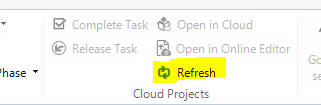
           If you are referring to this button on the files view this is only used for Cloud projects to fetch data from the cloud and refresh it locally. 

           Screenshot showing a 'Refresh' button with a cloud icon, indicating functionality for refreshing cloud projects in the Studio Developers Q&A application.

          The F5 short cut refreshes the view parts but seems it doesn't affect the view. I will need to look into it. 

    Best regards,

    Cornea Robert


    Generated Image Alt-Text
    [edited by: RWS Community AI at 2:44 PM (GMT 1) on 2 Apr 2025]
Children
No Data