
How to Merge AI Translation Suggestions into a Single Segment (the Target Segment)?

Hello everyone,

I'm using SDL Trados with AI-powered translation suggestions (OpenAI). As shown in the attached screenshot, the AI suggestion for segment 5 is split into two segments. How can I configure the settings so that the suggestion is displayed in the target segment as a single, complete sentence?
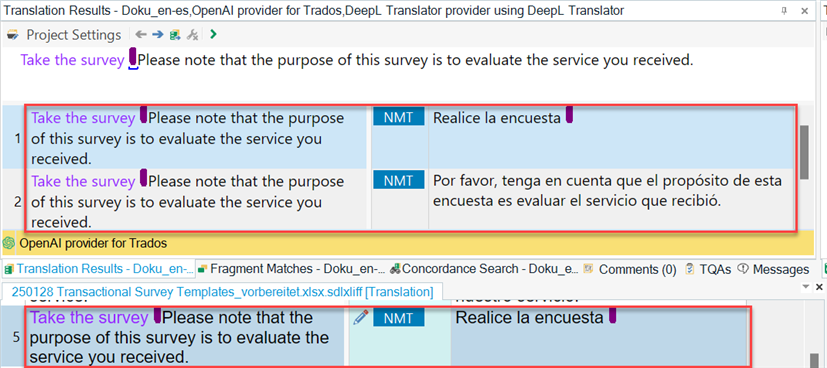
Screenshot of SDL Trados software showing translation results with segment 5 split into two parts, highlighted in red and blue.

The OpenAI is currently being used via the respective plugin, and the settings are as follows (We tried different connections and prompt settings. But it made no difference in the result.):
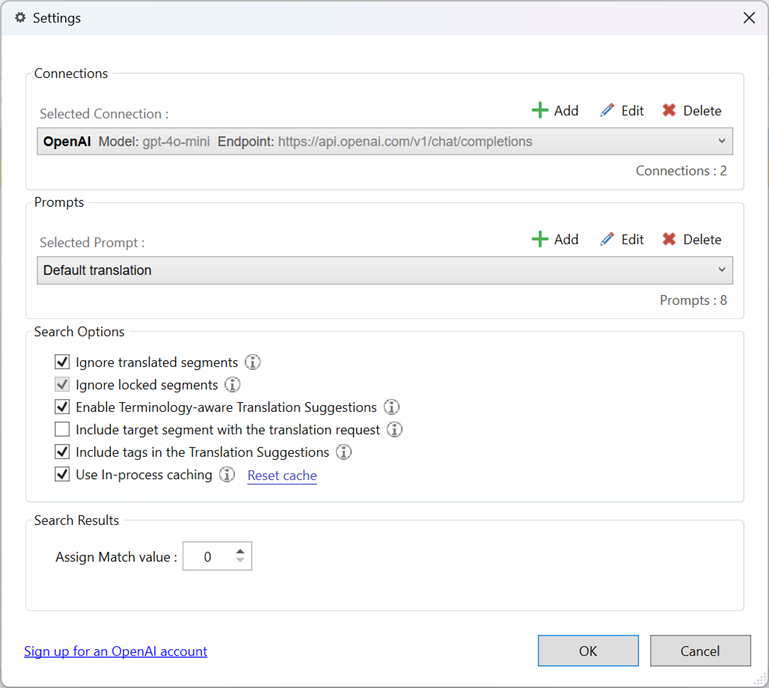
Screenshot of SDL Trados settings window with OpenAI connection selected, showing various checked options such as 'Ignore translated segments' and 'Include tags in the Translation Suggestions'.

For example, we tried adding the following text to the prompt:

# Instructions
1. **Unified Translation**: Ensure each translation suggestion appears as one complete entry, including all content and tags.

But unfortunately, we got the same result. Disappointed

I appreciate any guidance or solutions you might have!

Thank you!


Generated Image Alt-Text
[edited by: RWS Community AI at 5:49 AM (GMT 0) on 14 Feb 2025]
Parents
  • Hi  , I'm just trying to reproduce this issue, but not successful; might be that I'm missing something.

    Can you confirm that the steps I interpreted from your description are correct here?

    1. You merge two individual segments in the editor.
    2. Move focus to the merged segment.
    3. The provider returns a translation for the individual segments in the translation results view as opposed to a single merged segment.

    Can you provide a project package so that I can reproduce the issue you are reporting here?  if yes, please send to phartnett@rws.com with a link where I can download the project package.

    Patrick Andrew Hartnett | Developer Experience | Team Lead | RWS Group

Reply
  • Hi  , I'm just trying to reproduce this issue, but not successful; might be that I'm missing something.

    Can you confirm that the steps I interpreted from your description are correct here?

    1. You merge two individual segments in the editor.
    2. Move focus to the merged segment.
    3. The provider returns a translation for the individual segments in the translation results view as opposed to a single merged segment.

    Can you provide a project package so that I can reproduce the issue you are reporting here?  if yes, please send to phartnett@rws.com with a link where I can download the project package.

    Patrick Andrew Hartnett | Developer Experience | Team Lead | RWS Group

Children