MultiTerm Import

Former Member
Former Member

Hi

I'd like to know how can I use "SDL MultiTerm > Termbase Management > Import > Synchronize on Term" check item.

I'm in the middle of testing. Code goes..

Entries myEntries = myTB.Entries;
foreach(string myXMLitem in myXMLitems)
{
    Entry myEntry = myEntries.New(myXMLitem);
    //  myEntry.Merge(someTHING);
}

So far so good, I can import successfully for non_duplicated items.

But, I can not figure out how to manage duplicated items properly (entry Merge).

Just a brief hints/sample_codes should be perfect.

Thanks

[Version 2017]

OR

I just found this kind of codes. But, I can not handle it properly.

ImportDefinition myImportDefinition = myImportDefinitions[2];     // Synchronize on Term
myImportDefinition.ProcessImport(MtTaskType.mtScript, "English", "Chinese");

I have a proper XML file and I do not want to use "Wizard"

Thanks

Parents
  • Not sure what you mean by "not handle it properly", but your code looks OK. Here is a snippet from some old test code I had around, it performs an import without the wizard:

                string tbPath = @"C:\_temp\New Termbase.sdltb";
                string definitionName = "sync";

                Sdl.MultiTerm.TMO.Interop.Application mt =
                    new Sdl.MultiTerm.TMO.Interop.Application();
                TermbaseRepository tr = mt.LocalRepository;
                tr.Connect("", "");
                tr.Termbases.Add(tbPath, "Name", "description");
                Termbase tb = tr.Termbases[tbPath];

                tb.ImportDefinitions[definitionName].ProcessImport(MtTaskType.mtScript, "German", "English");

                tb.Close();
                mt.LocalRepository.Disconnect();

    But... you may have found a bug in the MultiTerm API, because it does not merge. If I run the same definition (called "sync" in my setup) in theUI, it properly merges entries. Through the API it does add them as new. You may be out of luck here, I can't see a bugfix for that being high priority.

  • Former Member
    0 Former Member in reply to Gerhard Kordmann

    thanks fo you precious time !

    Sorry, your code is nothing new

    and

    (have tried this time again minutes ago) makes/changes nothing

    Regards

    ah.. no bugs, all the time.

  • Former Member
    0 Former Member in reply to Former Member

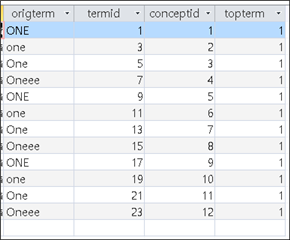
    Screenshot of Trados Studio showing a table with duplicate entries for the term 'one' in various cases and spellings, with corresponding term IDs, concept IDs, and top term indicators.

    You may well know when you see it carefully , I have 3 times duplicates (all of them)


    Generated Image Alt-Text
    [edited by: Trados AI at 1:20 PM (GMT 0) on 5 Mar 2024]
  • Former Member
    0 Former Member in reply to Former Member

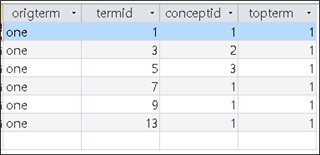
    it came from different process

    it is not perfct but it shows "some" positive result

    Screenshot of Trados Studio showing a table with columns origterm, termid, conceptid, and topterm, all rows contain the word 'one' with varying numerical values in other columns.


    Generated Image Alt-Text
    [edited by: Trados AI at 1:20 PM (GMT 0) on 5 Mar 2024]
  • Did you understand this part?

    But... you may have found a bug in the MultiTerm API, because it does not merge. If I run the same definition (called "sync" in my setup) in theUI, it properly merges entries. Through the API it does add them as new. You may be out of luck here, I can't see a bugfix for that being high priority.

    Gerhard is the developer of the Glossary Converter which correctly handles merging.  He said if you just use the API it may not merge correctly.  So he had to deal with this by writing his own code to handle it properly.

    I also agree a fix for this is very unlikely because the focus is on Cloud Terminology at the moment.  So your solution will have to be that you write the code to handle this correctly yourself.

    Paul Filkin | RWS

    Design your own training!
    You've done the courses and still need to go a little further, or still not clear? 
    Tell us what you need in our Community Solutions Hub

  • Former Member
    0 Former Member in reply to Paul Filkin

    If you see my first screenshot, you will know that I have executed "3" times(some of them are "9" times becuase it is caseInsensitive).

    I guess that is more than what he said.

Reply Children