Cannot install Studio SDK

I'm trying to install the SDK for Studio 2017, but each time I launch the installer, the installation begins but closes down abruptly after a couple of seconds. I've tried running the installer as admin, plus I've tried on a separate computer and I get the same result in both cases. Has anyone had the same issue?

Here's a screenshot showing the exact moment it closes down:
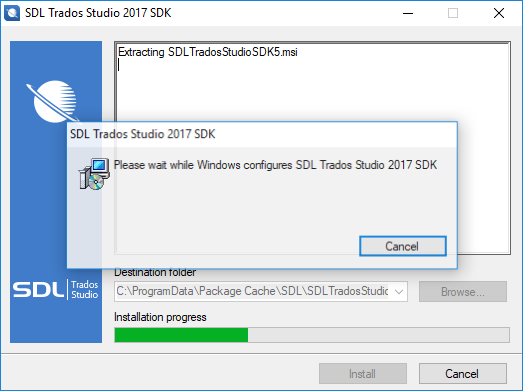
Screenshot of SDL Trados Studio 2017 SDK installation window with a progress bar, showing the message 'Please wait while Windows configures SDL Trados Studio 2017 SDK'. A 'Cancel' button is visible.

I'm running Visual Studio 2017 and I have .NET 4.7 installed, if that helps.

Thanks very much!


Generated Image Alt-Text
[edited by: RWS Community AI at 7:25 AM (GMT 0) on 15 Nov 2024]
Parents
  • Hi  

    Last year we released a Visual Studio extension which install all Studio 2017 Templates . Please try the following steps:

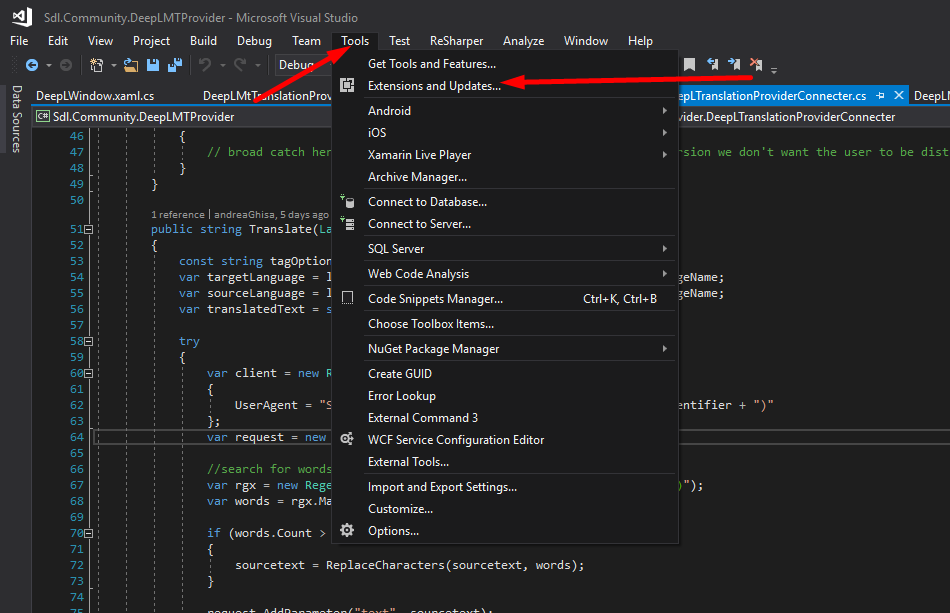
    1. In Visual Studio from the menu select "Tools" -> "Extensions and Updates"

    Visual Studio interface with the 'Tools' menu expanded showing 'Extensions and Updates' option highlighted.

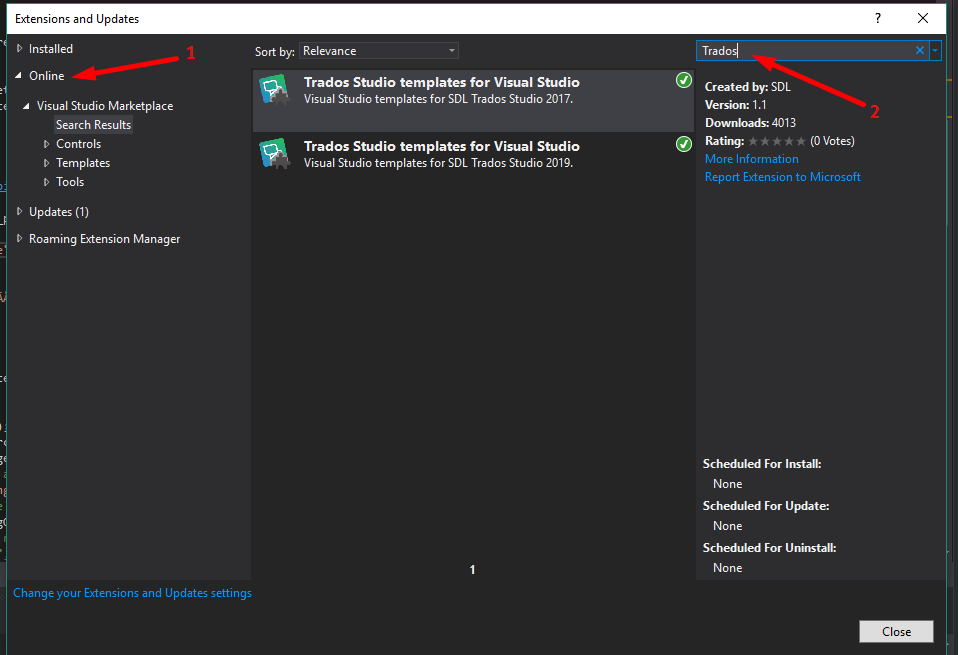
      2. A new window will open. From that window select "Online" tab and in Search box type "Trados"

    Extensions and Updates window in Visual Studio with 'Online' tab selected and 'Trados' typed in the search box.

    3. From the search result please select the templates for "SDL Trados Studio 2017" and install it. (Restart Visual Studio after the installation is complete)


    Could you please tell me if after following the steps you are able to use 2017 templates?


    Kind regards,

    Andrea Ghisa


    Generated Image Alt-Text
    [edited by: Trados AI at 1:06 PM (GMT 0) on 5 Mar 2024]
Reply
  • Hi  

    Last year we released a Visual Studio extension which install all Studio 2017 Templates . Please try the following steps:

    1. In Visual Studio from the menu select "Tools" -> "Extensions and Updates"

    Visual Studio interface with the 'Tools' menu expanded showing 'Extensions and Updates' option highlighted.

      2. A new window will open. From that window select "Online" tab and in Search box type "Trados"

    Extensions and Updates window in Visual Studio with 'Online' tab selected and 'Trados' typed in the search box.

    3. From the search result please select the templates for "SDL Trados Studio 2017" and install it. (Restart Visual Studio after the installation is complete)


    Could you please tell me if after following the steps you are able to use 2017 templates?


    Kind regards,

    Andrea Ghisa


    Generated Image Alt-Text
    [edited by: Trados AI at 1:06 PM (GMT 0) on 5 Mar 2024]
Children
No Data