
 Translate


I'm using the automation APIs to write a Trados plugin which creates projects (and optionally packages).
Here is a summary of the code I use to create the project.
var createdProject = new FileBasedProject(settings.ProjectInfo, new ProjectTemplateReference(settings.Template.FullName));

createdProject.AddFolderWithFiles(diFiles.FullName, true);

RunTasks(createdProject, settings);

createdProject.Save();

CreateProjectPackage(createdProject, settings);
Once created, the project is not listed on the Projects view. If I try to open the project in Trados I'm told...
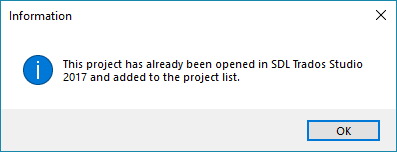
The project is not listed in the ~\Documents\Studio 2017\Projects\projects.xml file. I get the same message if I try to open the package.
However, if I close and re-open Trados I can open the project without any problem.
So why does Trados think that the project has been loaded? Is there a way to only conditionally load the project? Ideally I'd like the plugin to present this as an option to the user (for internal business reasons the person creating the package may not be the person who works with the package).
Generated Image Alt-Text
[edited by: Trados AI at 1:05 PM (GMT 0) on 5 Mar 2024]

