Project Templates getting to Marketplace for Visual Studio

Hello,

I am glad to announce that we prepared a VSIX extension for Visual Studio which will consist in the Project Templates needed to develop cool stuff for SDL Trados Studio. You can use this extension on Visual Studio 2017 or 2015, also all references were updated to Studio 5.

I attached a beta version of it, so you can try it out.

Feel free to send me feedback.

1488.SDL Trados Studio project templates for Microsoft Visual Studio.zip

Have fun developing,

Vasile Erdei

Parents
  • Hi

    I'm not having success building plugins using the supplied visual studio 2017 templates.

    It appears to be missing someting in the build process as the final *.sdlplugin is never built. 

    A few notes to maybe assist me finding out what is going wrong

    1. After creating the new project it seems to be missing
      1. packages.config
      2. pluginpackage.manifest.xml
    2. The output directory does contain a bunch of Sdl related dll's, including my test projects dll
    3. The Automation Samples that come with the SDL builds fine.

    Any ideas?

    Thanks!

  • I can verify what Ruvan posted... The projects are missing files and doesn't generate a sdlplugin file...
  • Hi,

    The template from Marketplace will be fixed soon, in the mean time we have an workaround for this:

    1. From Nuget download Sdl.core.pluginframework.build
    2. In csproj add the following  property group:

    <PropertyGroup>

        <CreatePluginPackage>true</CreatePluginPackage>

      </PropertyGroup>


    (To edit the csproj :Right click on project -> Unload Project -> Edit..)


    3.Pluginpackage.manifest is missing: please create a xml name it pluginpackage.manifest.xml .  Paste the following in your manifest file, just change the plugin name and description as you need


      <?xml version="1.0" encoding="utf-8"?>

    <PluginPackage xmlns="http://www.sdl.com/Plugins/PluginPackage/1.0">

      <PlugInName>Your plugin name</PlugInName>

      <Version>1.0</Version>

      <Description>Plugin description</Description>

      <Author></Author>

      <RequiredProduct name="SDLTradosStudio" minversion="12.0" />

    </PluginPackage>


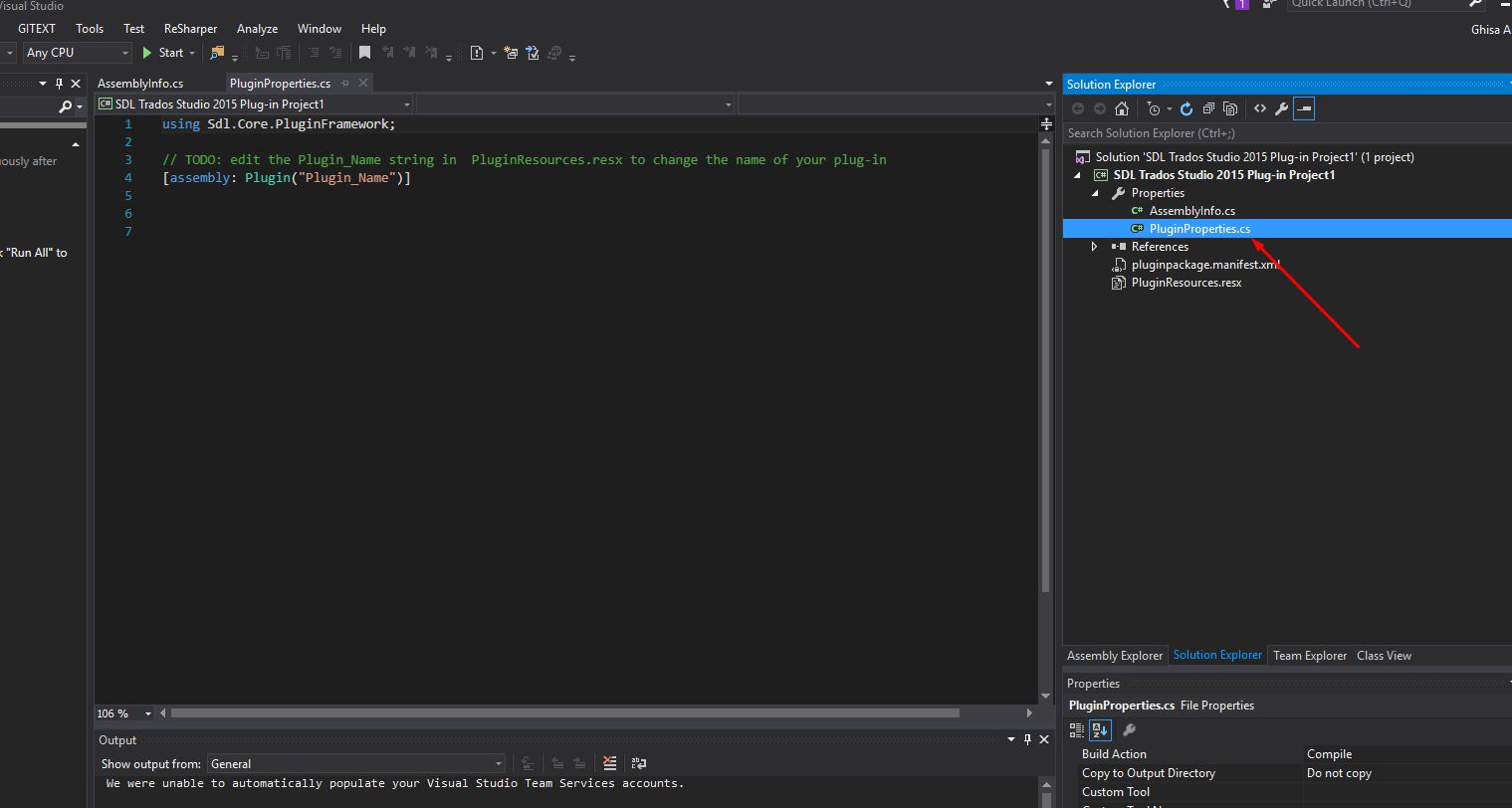
    1. PluginProperties.cs file is missing too (see picture attached where it should be):

    In the file copy the following:


    using Sdl.Core.PluginFramework;


    // TODO: edit the Plugin_Name string in  PluginResources.resx to change the name of your plug-in

    [assembly: Plugin("Plugin_Name")]

Reply
  • Hi,

    The template from Marketplace will be fixed soon, in the mean time we have an workaround for this:

    1. From Nuget download Sdl.core.pluginframework.build
    2. In csproj add the following  property group:

    <PropertyGroup>

        <CreatePluginPackage>true</CreatePluginPackage>

      </PropertyGroup>


    (To edit the csproj :Right click on project -> Unload Project -> Edit..)


    3.Pluginpackage.manifest is missing: please create a xml name it pluginpackage.manifest.xml .  Paste the following in your manifest file, just change the plugin name and description as you need


      <?xml version="1.0" encoding="utf-8"?>

    <PluginPackage xmlns="http://www.sdl.com/Plugins/PluginPackage/1.0">

      <PlugInName>Your plugin name</PlugInName>

      <Version>1.0</Version>

      <Description>Plugin description</Description>

      <Author></Author>

      <RequiredProduct name="SDLTradosStudio" minversion="12.0" />

    </PluginPackage>


    1. PluginProperties.cs file is missing too (see picture attached where it should be):

    In the file copy the following:


    using Sdl.Core.PluginFramework;


    // TODO: edit the Plugin_Name string in  PluginResources.resx to change the name of your plug-in

    [assembly: Plugin("Plugin_Name")]

Children
No Data