Font in Studio 2024 no longer the same as in source doc (word)

The Word document that I'm working with is not displayed in its original formatting (i.e. with the same font, size etc. as in the original Word document) - instead, all segments (source, target, footnotes etc.) are displayed in the same (bland and quite large) font (think Phase/Memsource). When my project manager opens the file, it is displayed with its original formattting, so the issue is evidently with my Trados.

I recently had to remove and re-install Trados as the program wasn't responding - might there be a correlation?

Thankful for any advise on what to do.


Removed AI Suggestion
[edited by: Anna Jalmars at 1:54 PM (GMT 0) on 26 Nov 2025]

emoji
  • Probability score: 0.7  

    Question improvement suggestion: Provide the exact version of Trados Studio you are using and any specific error messages you may have encountered.  

    In the meantime, based on the information you have provided, here is a suggested answer to your question:  

    Hello!  

    It sounds like you're experiencing some frustrating formatting issues in Trados Studio 2024. Let's go through a few steps to help you resolve this:

    **Step 1:** Check Font Adaptation Settings  

    - Go to **File > Options > Editor > Font Adaptation**. Here, you can adjust the maximum or minimum font size for both source and target text. Make sure these settings are configured to your preference.

    **Step 2:** Toggle Formatting Tag Display  

    - In the Editor view, ensure that you have enabled the display of formatting tags. Go to **View > Options** and check the **Toggle display of formatting tags** option. This will help you see if any formatting tags are missing.

    **Step 3:** Verify Document Formatting  

    - Open your Word document and check the font settings. Ensure that there are no advanced formatting options (like superscript or subscript) that might not be recognized by Trados. You can check this by going to **Home > Font > Advanced** in Word.

    **Step 4:** Re-import the Document  

    - If you made any changes to the Word document, save it and re-import it into Trados Studio. Sometimes, re-importing can resolve formatting issues.

    **Step 5:** Check for Updates  

    - Make sure you are using the latest version of Trados Studio. Updates often include fixes for known issues, including formatting problems.

    **Step 6:** Consider Reinstallation  

    - Since you mentioned that you had to reinstall Trados, ensure that the installation was successful and that all components are functioning correctly. If issues persist, a clean reinstall might be necessary.

    If after trying these steps the issue still exists, it may be beneficial to check if there are any specific bugs related to your version of Trados Studio or consider reaching out for further assistance.  

    I hope this answer addressed your question. If not, please reject the answer, add the question improvement suggestion information, and click the RWS Community AI checkbox on the right to try again.  

    RWS Community AI

    emoji
  •  

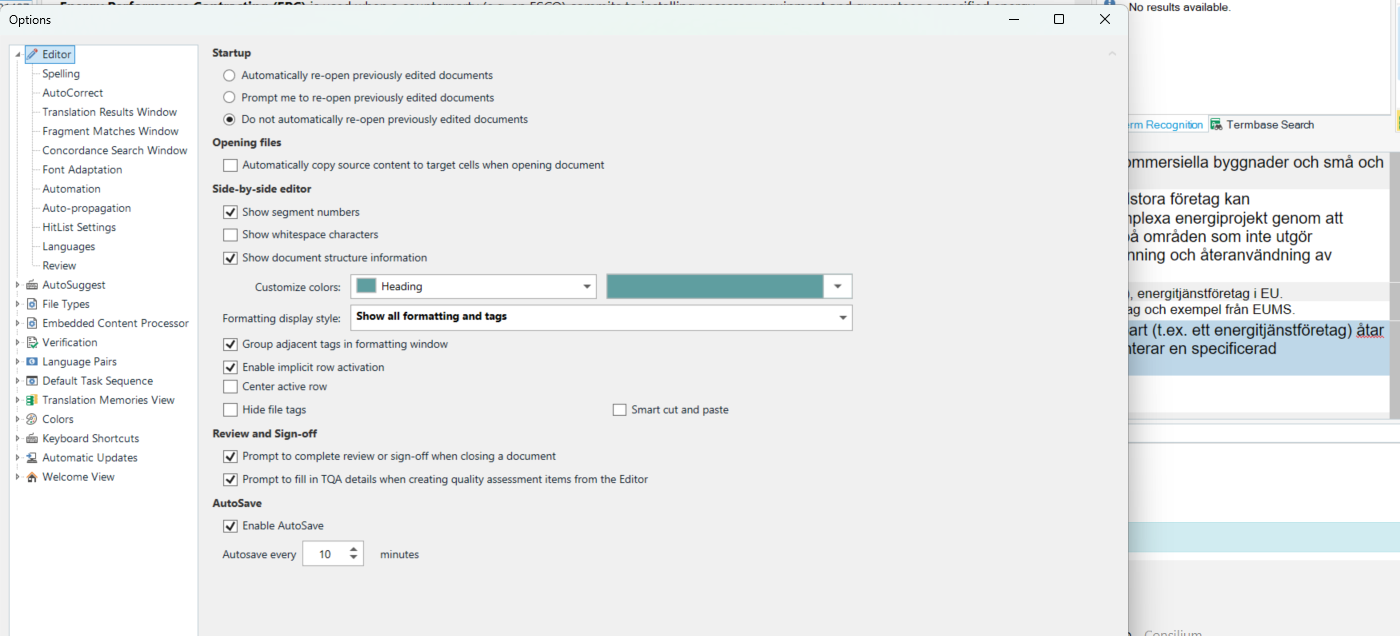
    This is not an "issue". Most probably the font used in source does not support your target language (or you do not have such font installed). Windows uses font substitution and does not even tell this to the user. The best way to deal with such "issues" is not showing any formatting in Trados, but working with just plain text. You can change this setting in File -> Options -> Editor -> Formatting display style.

    _________________________________________________________

    When asking for help here, please be as accurate as possible. Please always remember to give the exact version of product used and all possible error messages received. The better you describe your problem, the better help you will get.

    Want to learn more about Trados Studio? Visit the Community Hub. Have a good idea to make Trados Studio better? Publish it here.

    emoji
  • Thank you. To me this is an issue unfortunately, and I would like it solved. My PM views this specific document with its original formatting, the way I usually do to. In "formatting display style", the alternative "show all formatting and tags" is already selected. So the problem is something else. Any more suggestions on what the issue might be?

    emoji
  •  

    You need "show all tags but do not show formatting".

    Which font is used in source? Do you have it installed? Does it support your target language? You may not expect any font to support Polish for example. There might be huge issues with this or other Slavic languages, if the font used does not support the proper character set. Ask your PM, which fonts are used.

    _________________________________________________________

    When asking for help here, please be as accurate as possible. Please always remember to give the exact version of product used and all possible error messages received. The better you describe your problem, the better help you will get.

    Want to learn more about Trados Studio? Visit the Community Hub. Have a good idea to make Trados Studio better? Publish it here.

    emoji
  •  

    This isn't an issue... just a setting.  Many translators prefer to translate without any formatting at all because it's not really relevant, and all formatting is controlled by tags.  A bit of an old article but probably still relevant:

    https://multifarious.filkin.com/2012/09/10/working_with_tags/

    Paul Filkin | RWS

    Design your own training!
    You've done the courses and still need to go a little further, or still not clear? 
    Tell us what you need in our Community Solutions Hub

    emoji
  • Thanks Paul, exactly what your friend suggested above, and that's not the issue unfortunately. All tags and fonts should be displayed; originals is in times new roman, I'm not translating into a Slavic language and have never had this issue before. This is something more complex, it seems.'

    emoji
  • HI Jerzy, I'm not translating into a Slavic language and have never had this issue before. I suspect that it may have something to do with the fact that I recently reinstalled Trados. I'm using Trados 2024. Original font is Times New Roman.

    Trados Studio options window showing settings for the Editor, including Startup, Opening files, Side-by-side editor, Review and Sign-off, and AutoSave options.

    emoji


    Generated Image Alt-Text
    [edited by: RWS Community AI at 4:27 PM (GMT 0) on 26 Nov 2025]
  •  

    What is the language and version of your Windows? And which Windows version has your PM? Are you sure the font defined in the styles of the source text is Times New Roman? 

    _________________________________________________________

    When asking for help here, please be as accurate as possible. Please always remember to give the exact version of product used and all possible error messages received. The better you describe your problem, the better help you will get.

    Want to learn more about Trados Studio? Visit the Community Hub. Have a good idea to make Trados Studio better? Publish it here.

    emoji
  •  

    Can I see your sdlxliff file?  If it's acceptable you can send it to pfilkin at sdl dotcom

    Paul Filkin | RWS

    Design your own training!
    You've done the courses and still need to go a little further, or still not clear? 
    Tell us what you need in our Community Solutions Hub

    emoji
  • Can't do that due to confidentiality, but any other advice/tips would be very much appreciated!

    emoji