Font mapping Simplified Chinese not working

Former Member
Former Member

Hi,

I am trying to map some fonts for Chinese in IDML file type, but I'm afraid it's not working as it's supposed to be. Or maybe I'm doing or understanding something wrong?

Here's what I do:

Project Settings > File Types > IDML > Font mapping
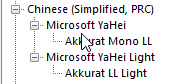
Font mapping settings in Trados Studio showing Akkurat Mono LL mapped to Microsoft YaHei and Akkurat LL Light mapped to Microsoft YaHei Light under Chinese (Simplified, PRC).

The way I understand it, this should map the Akkurat Mono LL of my source file to Microsoft YaHei in my target file. Idem with Akkurat LL Light and Microsoft YaHei Light.

However, when I open the generated Chinese IDML file in InDesign, it looks like this:
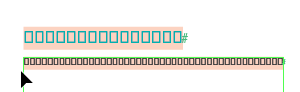
Generated Chinese IDML file in InDesign showing text replaced with square boxes, indicating font rendering issues.

What am I doing wrong?

Any help appreciated! :)

Kind regards,

Katharina

Trados Studio 2024 SR1 18.1.2.6370

InDesign: 20.5 x64


Generated Image Alt-Text
[edited by: RWS Community AI at 1:12 PM (GMT 1) on 20 Oct 2025]

emoji
  • Former Member
    0 Former Member in reply to Paul Filkin


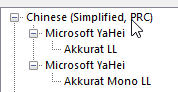
    Ok, I understand what you mean, thanks for the good explanation! But I made it work now: when I first tried it with font families, I only used one font family because I somehow thought the mapping only works one on one, not two on one as I have it now. And with the font families correctly mapped, it seems to differentiate on its own between light and bold.

    Screenshot showing a tree structure with 'Chinese (Simplified, PRC)' as the main node, containing 'Microsoft YaHei' with sub-nodes 'Akkurat LL' and 'Akkurat Mono LL'.

    So thanks a lot once again! Smiley

    emoji


    Generated Image Alt-Text
    [edited by: RWS Community AI at 12:57 PM (GMT 1) on 21 Oct 2025]