
Term Recognition not showing terms with 2 letters and one sign

  and/or  ,

Re: Trados Studio 2021 Freelance SR 2 16.2.12.9338

I have noticed that the Term Recognition window shows terms with 2 or more letters and 1 sign, even with a space between them, but it does not show terms with one letter followed by one sign followed by one letter. Please see the attached image. The terms of segments 1-6 are recognized, but not those in segments 7-10.

Please let me know if this is the normal behavior or a bug. Either way, can it be fixed?

Thank you very much,

Sílvia
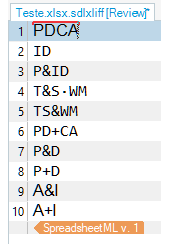
Screenshot of Trados Studio Term Recognition window showing recognized terms in segments 1-6 but not in segments 7-10.


Generated Image Alt-Text
[edited by: Trados AI at 12:36 PM (GMT 0) on 29 Feb 2024]

emoji
  • Hello Sílvia,

    Thank you for reaching out with your question. It seems you're experiencing an issue with term recognition in Trados Studio 2021. The behavior you're describing is not a bug, but rather a default setting in Trados Studio. By default, Trados Studio is set to recognize terms that are three characters or longer. However, you can adjust this setting to recognize shorter terms. Here's how:

    Step 1: Go to "File" > "Options" > "Language Pairs" > "All Language Pairs" > "Termbases" > "Search Settings."

    Step 2: Check the box that says "Enable recognition of two-letter terms."

    Step 3: Click "OK" to confirm the changes.

    Step 4: Restart Trados Studio to ensure the changes are applied correctly.

    After following these steps, Trados Studio should recognize and display terms that are two characters long, including those with a sign between them. If you're working on a specific project, you'll need to adjust the settings within the project. Here's how:

    Step 1: Go to the "Project" view.

    Step 2: Right-click your current project from the project list and choose "Set as active project."

    Step 3: Right-click again on your active project and choose "Project Settings" > "Language Pairs" > "All Language Pairs" > "Termbases" > "Search Settings."

    Step 4: Check the box that says "Enable recognition of two-letter terms."

    Step 5: Click "OK" to confirm the changes.

    Step 6: Restart Trados Studio to ensure the changes are applied correctly.

    I hope this helps! If you have any other questions, feel free to ask.

    Best regards,

    RWS Community AI

    emoji
  •   

    The behaviour is inconsistent because these are all recognised:

    P&ID
    T&S WM
    TS&WM

    But this is not:

    PD&CA

    This term is found but without the &, which also seems inconsistent.

    Are these really terms though, or do they remain the same in the translation and might be better as variables?

    However, given the majority I think they should probably all be recognised.

    Paul Filkin | RWS

    Design your own training!
    You've done the courses and still need to go a little further, or still not clear? 
    Tell us what you need in our Community Solutions Hub

    emoji
  • Recognition of two-letter terms is enabled and it works when there are only letters. If there are two letters with one sign between them it does not work.

    emoji
  • Dear Mr.  ,

    Thanks for your attention. 

    Some of these terms do not remain the same in the translation, therefore they all should be recognized as terms. I hope there is a solution.

    emoji
  • Hello Mr.  and Mr.  !

    It seems that there is no solution to this case. One last question: should I include this issue in the Trados Studio Ideas Forum, in order to get the attention from the developers? Thank you!

    emoji
  •  

    should I include this issue in the Trados Studio Ideas Forum, in order to get the attention from the developers?

    No, the ideas forum isn't for bugs.  I'll raise a possible bug with the support team to validate and if appropriate they will advise the development team.

    Paul Filkin | RWS

    Design your own training!
    You've done the courses and still need to go a little further, or still not clear? 
    Tell us what you need in our Community Solutions Hub

    emoji
  •   

    This is now logged as a bug with our reference CRQ-35861.  Just so we can easily check it against future releases of the software.

    Paul Filkin | RWS

    Design your own training!
    You've done the courses and still need to go a little further, or still not clear? 
    Tell us what you need in our Community Solutions Hub

    emoji
  • Dear Mr.  and/or other responsibles for Trados Studio,

    The error remained unsolved in the 2021 version, and I gave up complaining. To my great disappointment, it continues to occur in the 2024 version. When will it be fixed?

    Thanks.

    emoji
  •   

    It is resolved if you use Cloud based terminology - that you do have access to:

    There will also be some substantial changes to the local terminology provider capability in the next release.  It's in Beta now and whilst I have not tested this with the Beta build it might just be something that could be easier to fix now.

    Worth noting however,  , that the & and the + symbols seem to be recognised as 100% matches so when looking up "A&I" or "A+I" they will each return "A&I" and "A+I" as 100% matches which is incorrect. 

    Paul Filkin | RWS

    Design your own training!
    You've done the courses and still need to go a little further, or still not clear? 
    Tell us what you need in our Community Solutions Hub

    emoji

