
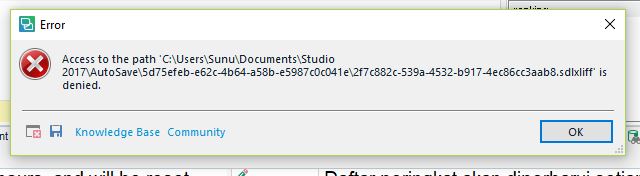
Access to the path AutoSave is denied.

Hi All,

I just installed Studio 2017 yesterday and everything went perfect. Suddenly today I received an error "Access to the path 'C\Users\Sunu\Documents\Studio 2017\AutoSave\.....sdlxliff' is denied. The error message suddenly popped-up and everytime I try to save my work.

Please help!

Regards,

Sunu
  • Hello  

    Copy to  

    I am not happy that the solution offered involves disabling cloud backup for my entire Documents folder.

    I can understand that, but you might be more clever. You have this problem because (writing under Paul's control!) I believe that by default SDL project files are saved somewhere in C:\Users\my name\Documents [Dangerous if you must solve a serious OS problem]. I never faced your problem hereabove probably brcause for ages I have been proceeding differentlly

    In my D:\ drive, an enormous Translations folder gathers 467 (so farGrin) outsourcer folders, everyone with individual translation project sub-folders, and it is where I create the SDL project folder with its typical *.sdlproj file plus three sub-folders (Luckily this kind of path has never proved too long [in excess of 250 characters?]) And thus I avoid any conflict with OneDrive.

    You might think of something similar.

    emoji
  •  

    Exactly... ish...


    I am not happy that the solution offered involves disabling cloud backup for my entire Documents folder.

    That is your conclusion, it's not what I said.

    You also have some control over this yourself because you can manage the way OneDrive handles your folders.  If you don't make sure that the folders Studio uses are always available (they can be in the cloud too, but should always be locally available) then you'll probably have less problems.

    So, all you need to do is address the folders that Studio is using, not your entire documents folder.  I also didn't say disable the backup, I said they can be cloud only, or always available locally, or both.  So you just need to make sure that the folders in question are available offline and in the cloud (so you still have your backups).

    Or take the advice from Gérard.  I do that with my home laptop, although I don't use a mapped drive, or external drive for this.  I just put Studio related stuff here... and any other files that cause similar problems because of OneDrive:

    c:\Users\paul\Documents\Trados Studio Projects\

    As opposed to here:

    c:\Users\paul\OneDrive\Documents\Trados\

    And I run a back up into a 2-bay external drive for everything I need to ensure I can recover it.  Cloud or not... I don't trust it and want to be sure I always have access to all of my files locally.

    Paul Filkin | RWS

    Design your own training!
    You've done the courses and still need to go a little further, or still not clear? 
    Tell us what you need in our Community Solutions Hub

    emoji
  •  

    Project template for your projects, and for other resources you could always put them wherever you liked.

    Paul Filkin | RWS

    Design your own training!
    You've done the courses and still need to go a little further, or still not clear? 
    Tell us what you need in our Community Solutions Hub

    emoji
  • My Location setting is a local path. 

    Where does the C:\Users\...\OneDrive\... come from?

    emoji
  •  

    Where does the C:\Users\...\OneDrive\... come from?

    What's in there?

    Paul Filkin | RWS

    Design your own training!
    You've done the courses and still need to go a little further, or still not clear? 
    Tell us what you need in our Community Solutions Hub

    emoji
  •  

    Have you a standard Windows 11 installation? The "Documents" folder is very often linked to OneDrive, even if you do not notice. However, you can move the Documents folder (as any other folder from the MS Libraries) to a location of your choice, making sure it is not in any way linked to OneDrive. Usually the path to these folders is on drive C:\. One of the first actions when I get a new PC is moving these folders out from C:\. There is no worse location for data as C:\, where Windows and all other programs are. D:\ or any other drive is much better. At least from my long term experience with several Windows versions since 7 or even longer.

    _________________________________________________________

    When asking for help here, please be as accurate as possible. Please always remember to give the exact version of product used and all possible error messages received. The better you describe your problem, the better help you will get.

    Want to learn more about Trados Studio? Visit the Community Hub. Have a good idea to make Trados Studio better? Publish it here.

    emoji
  • And I run a back up into a 2-bay external drive for everything I need to ensure I can recover it.  Cloud or not... I don't trust it and want to be sure I always have access to all of my files locally.

    To elaborate more on this:

    My Documents folder IS located in OneDrive, but has been moved to my local drive E:\
    It might be important, that I use OneDrive for Business.

    All my TMs and TBs are stored locally on D:\

    But ALL projects including project translation memories go on a 2-bay NAS, which is a mapped drive under Windows. This NAS has a 2.5 G LAN connection, exactly as my PC and the switch. This NAS is than live backuped on a next 2-bay NAS. From there a remote replication (Rsync protocol) goes to a next 2bay NAS and from there to the last one with 1 bay.
    To make sure, all my local TMs and TBs are also backed up, I run a synchronisation task (via GoodSync) on PC start and at 8 pm from D:\ to the main NAS. This way I can recover everything from last 48 hours. Of course also the content of my Documents folder is synchronized with NAS, even though files from there are also in OneDrive.

    All this works without any hassle. This said, configuring all this takes some time with a new PC, but the result pays for the time invested. Since I have this system (the first NAS came here in 2010), I never lost anything. And I do not have to rely on any cloud.

    _________________________________________________________

    When asking for help here, please be as accurate as possible. Please always remember to give the exact version of product used and all possible error messages received. The better you describe your problem, the better help you will get.

    Want to learn more about Trados Studio? Visit the Community Hub. Have a good idea to make Trados Studio better? Publish it here.

    emoji
  • C:\Users\arudd\OneDrive\Documents\Studio2019\Autosave\570...

    I still have Windows 10

    emoji
  •  

    The path to your Windows Documents folders goes via OneDrive.

    Open Windows Explorer and right click the Document folder, choose Properties. Once there, choose Path. In You should see three buttons there, one of these saying "Move". Use this to move to another location. This way no further problems with AutoSave should occur.

    _________________________________________________________

    When asking for help here, please be as accurate as possible. Please always remember to give the exact version of product used and all possible error messages received. The better you describe your problem, the better help you will get.

    Want to learn more about Trados Studio? Visit the Community Hub. Have a good idea to make Trados Studio better? Publish it here.

    emoji


