Html Codes within Excel File

Hello All

I want Trados Studio to split excel cell contents into segments based on embedded HTML codes

e.g:

<B>Product Features</B><BR>Throws are acrylic knitted<BR>Product size : 130x170 cm <BR>Product colour is beige. <BR><BR><B>Washing Recommendations</B><BR>Washable at 30 degrees.<BR>Do not bleach.<BR>Do not iron.

----------------------

Product Features
Throws are acrylic knitted
Product size : 130x170 cm
Product colour is beige. 
Washing Recommendations
Washable at 30 degrees.
Do not bleach.
Do not iron.

--------

this is a sample

sample-br.xlsx

thanks 

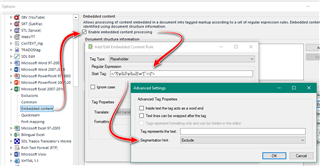
  • The default rules will handle this and should give you an idea of how to improve it if you wish:

    Trados Studio settings window with 'Embedded content' section highlighted, showing options for enabling embedded content processing and advanced settings.

    Paul Filkin | RWS

    Design your own training!
    You've done the courses and still need to go a little further, or still not clear? 
    Tell us what you need in our Community Solutions Hub

    emoji


    Generated Image Alt-Text
    [edited by: Trados AI at 4:18 AM (GMT 0) on 5 Mar 2024]
  • Or you can use more distinctive approach by adding individual rules for the htmł element.

    This would be for example

    <b> </b> as tag pair with no extra segmentation hint, but with selected feature "Tag acts as word end" (is really VERY important when translating and should be selected by default, dear SDL)

    <br> as placeable with the segmentation hint "exclude"

    and so on...

    _________________________________________________________

    When asking for help here, please be as accurate as possible. Please always remember to give the exact version of product used and all possible error messages received. The better you describe your problem, the better help you will get.

    Want to learn more about Trados Studio? Visit the Community Hub. Have a good idea to make Trados Studio better? Publish it here.

  • I find this regex-based approach rather amateurish, cumbersome and most importantly failing big time with just a little bit more complex HTML code, not mentioning anything more complicated (containing entities, comments, inline scripts, etc.)

    Therefore I use a simple script which exports the HTML content to very simple XML structure like this

    <string cell="A1">blablabla, some complicated HTML code</string>

    This is then easily processed using the XML with HTML embedded content, with all comfort of embedded content parser.

    And then it's again very easily injected back into the appropriate places into the original Excel sheet using another  rather dumb script which only reads the cell location from the XML element attribute and puts the string in the cell.

    Not a method for average Joe Translator, I know...

  • Why not then simply save Excel as XML and process that in Studio? Not that complicated as it seems...

    _________________________________________________________

    When asking for help here, please be as accurate as possible. Please always remember to give the exact version of product used and all possible error messages received. The better you describe your problem, the better help you will get.

    Want to learn more about Trados Studio? Visit the Community Hub. Have a good idea to make Trados Studio better? Publish it here.

  • Not usable with multilingual Excels - where target (or rather multiple targets... like 15 languages or so) is to be placed to other cells than the source.

  • Indeed. I have rarely to deal with such, sorry - this is why I usually go the easiest way for a freelancer.

    _________________________________________________________

    When asking for help here, please be as accurate as possible. Please always remember to give the exact version of product used and all possible error messages received. The better you describe your problem, the better help you will get.

    Want to learn more about Trados Studio? Visit the Community Hub. Have a good idea to make Trados Studio better? Publish it here.

  • Maybe this is an 'overkill' solution, but I can see that your sample also seems to contain non-HTML columns. And while the Embedded Content solution provided by Paul does the trick to identify HTML tags, it does not recognise HTML character codes (if you should have any on your files).

    So, just my two cents:

    For such files, we use the XML options in Excel's Developer tab:

    1. Use Notepad++ to create a simple file with the names of the Excel columns, which look like this:

              <?xml version="1.0" encoding="UTF-8" standalone="yes"?>
              <File xmlns:xsi="">www.w3.org/.../XMLSchema-instance">
              <Element>
              <Column1>a</Column1>
              <Column2>a</Column2>
              </Element>
              <Element>
              <Column1>a</Column1>
              <Column2>a</Column2>
              </Element>
              </File>

    2. Use the Source button in Developer > XML in Excel to add this XML map to the Excel file for translation. Then drag and drop each of the XML elements from the XML map onto the respective Excel column heading (which will create a table).

    3. Click Export in Developer > XML to export your table to an XML file.

    4. In Studio, create specific XML file type settings. As such you can configure which elements / columns need to be translated (maybe not all Excel columns need to be translated) and you can add document structure information to elements. You can then use this document structure information to have HTML content processed using Studio's embedded "Html Embedded Content 5 2.0.0.0" processor, which will recognise both HTML tags and HTML character codes. And non-HTML columns will not be processed as containing HTML.

    5. After translation of the XML file, just open the Excel file and click Developer > XML > Import to import the translated XML file.

    Bit of a long process, I know, but once you know how it works, we have found the results to make it worthwhile the effort.

    Won't work either for Excel files with multiple languages, of course...

    Best,
    Lieven